Google AI Overviews for Service Businesses: What to Fix First
See how Google AI Overviews describe your service business and what to fix first, from page structure to reviews and entity details, with a 14-day plan.
Finchbyte Team 9 min read
A client types "best HVAC contractor in Mississauga with emergency service" and reads an AI-written summary before any blue link. That summary names two companies, links three pages and skips yours. For owners and marketing managers, Google AI Overviews for service businesses have quietly become the first impression, and the fix is usually a short list of page, proof and profile problems rather than a new content machine.
This guide covers where those summaries show up for service searches, what Google leans on to write them, the five fixes in order, and a 14-day plan you can run with one person for a few hours a week.
Where AI Overviews Show Up in Service Searches
AI Overviews appear most on queries where someone is comparing options or asking something practical, and least on short branded or navigational searches. From our own prompt monitoring across client accounts (not a Google-published figure), the pattern holds across industries: local service queries show summaries most often, and brand-name searches show them least.
For context, here is what that monitoring has looked like across service sectors over the last quarter. Treat it as a rough guide to where to look first, not a promise about your own queries.
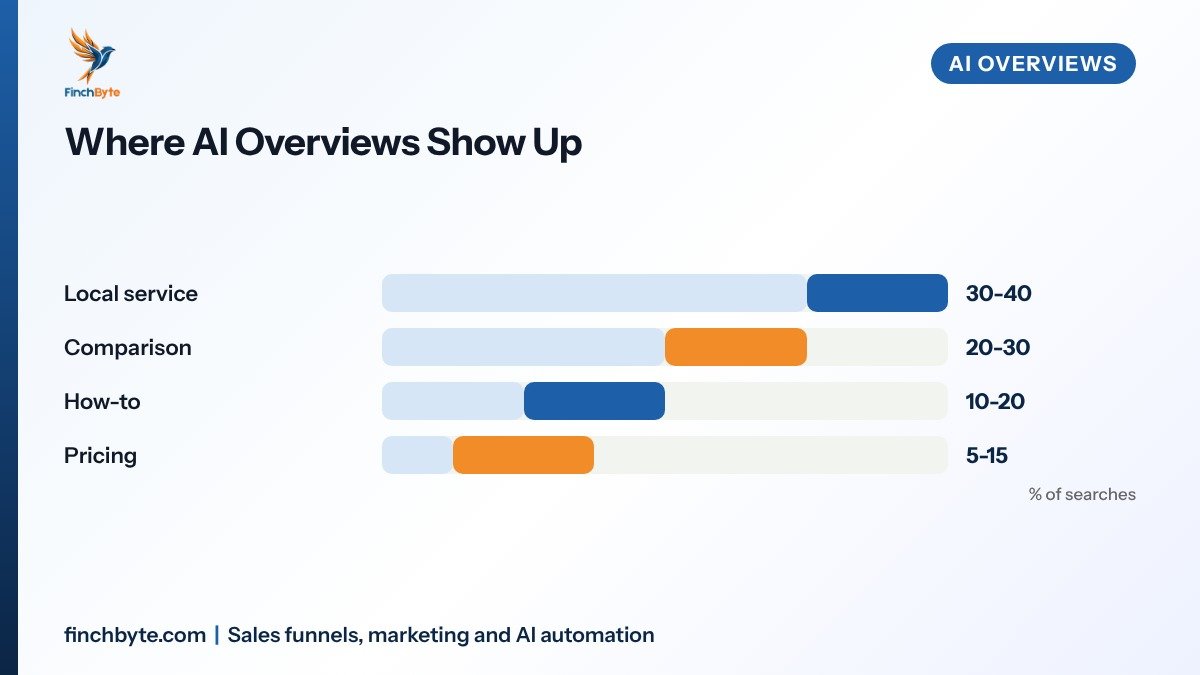
Local service and comparison queries matter most for most Finchbyte readers, so start monitoring there. If you want a repeatable way to log what the assistants say each month, this AI search visibility report covers the sheet and the prompt list.
What Google Uses to Write the Summary
An AI Overview is assembled, not authored. Google runs its usual ranking step over the pages it can crawl, then writes a summary from the passages it selected and adds links back to them. Three inputs shape what your business looks like inside it.
Page passages. Google quotes the passage that answers the question most directly, usually a heading followed by a short paragraph or a list. A 600-word wall with no subheadings gives it nothing clean to lift.
Structured and crawlable data. Schema markup (the code that labels your business, service, FAQ or review for machines) and a clean HTML structure help the system match a claim to an entity. Entity means the thing your page is about, in this case your company as a single identifiable business.
Off-site mentions. Review sites, directories, local press, forums and industry listings tell Google whether other sources agree that you exist, do what you claim and serve the area you name.
Google summarises what it can find and agree on, so make the answer easy to lift and easy to verify.
Fix 1: Give Every Service Page a Direct Answer Block
Most service pages are written to persuade. AI summaries are extracted from pages written to answer. You need both on one page, in a predictable order.
Work down the page in this order:
- Answer first. Open with two or three sentences that state the service, who it suits and the outcome, using the words buyers type rather than your internal jargon.
- Break it up. Add three to five descriptive H2 or H3 subheadings that match real questions, such as timelines, what is included and what affects the price.
- Add one list. Include one short list of steps, inclusions or requirements, since lists lift cleanly into summaries.
- State the boundaries. Say plainly what you do not do, which service tiers are missing, and where a job needs a specialist. Honest limits read as expertise.
- Name the area. Write the cities and neighbourhoods you serve in the copy, not only in the footer or a hidden dropdown.
Keep each paragraph to three or four sentences. If a paragraph needs a comma, a semicolon and a caveat in the same line, split it. For the on-page structure that supports this, see Service page FAQs and Internal linking for service websites.
Fix 2: Make Reviews and Mentions Agreeable
An AI answer that recommends competitors usually means the sources outside your site say more about them than about you. This is the slowest fix and the one owners skip.
- Pick three review sources. Choose the two your buyers actually read, such as Google Business Profile and one industry directory, plus one niche listing relevant to your trade.
- Ask after the job, not before. Request reviews at handover when the outcome is fresh, and keep the request personal rather than a bulk email blast. Respect CASL and PIPEDA in Canada, the DPDP Act in India and GDPR for EU contacts, and get our Lead qualification checklist for who is right to contact.
- Answer every review. Replies are public context. A calm response to a complaint gives the summariser something balanced to quote.
- Fix mismatched listings. Duplicate profiles, an old phone number or two different service areas split your signals across sources. The Local SEO checklist for Ontario service businesses walks through the cleanup.
If your brand appears in third-party roundups, podcasts or local news, note which ones Google tends to cite in your niche and work those first. Finchbyte's AI search optimisation service covers this monitoring and the outreach list.
Fix 3: Fix Your Entity Before Your Content
If assistants mix you up with a similarly named firm, or describe services you dropped years ago, more blog posts will not help. This is an entity problem, and it is usually a data problem.
Check these five places and make them say the same thing:
- Google Business Profile. Name, category, services, service area and hours match your website exactly.
- Website contact and about pages. Legal name, address, phone and the services you currently sell, with no legacy pages still promising retired offers.
- Schema. Organization, LocalBusiness and Service markup on the right pages, with the same name, same URL and same phone number everywhere.
- Directory listings. The main aggregators plus your trade association listing, all pointing to the same canonical website.
- Social profiles. Same display name and same one-line description across LinkedIn, Facebook and any trade platform.
Where the same facts disagree, the summariser picks whichever source it trusts more, which is often not you. This post goes deeper on the failure mode: Entity consistency for AI assistants.
Fix 4: Track What the Assistants Actually Say
You cannot fix a sentence you have never read. Build a small monitoring habit before you change any copy, so you can tell a real improvement from a coincidence.
Run the same 15 to 20 prompts across Google (with AI Overviews), ChatGPT, Gemini and Perplexity. Include your branded queries, your top three service-plus-city queries, two comparison queries and two cost or process queries. Log four things per prompt: whether your business is named, which competitors are named, which pages or sources are cited, and any factual error about your services, pricing model or area.
Do it monthly rather than daily. Answers shift with model updates and source refreshes, so a single week tells you very little. Keep the numbers in the same sheet you use for enquiries, so you can see whether a naming change lines up with a change in call volume.
Fix 5: Do Not Break What Google Already Needs
AI summaries inherit the crawl and index health of your site. A page Google cannot render cannot be quoted.
- Keep content in HTML. Text rendered only by JavaScript after the page loads may never reach the summariser.
- Check rendered HTML. Use the URL inspection tool in Search Console to confirm your answer block and lists survive rendering, as covered in Google Search Console for small businesses.
- Watch page speed on lead pages. Heavy hero video and script bundles slow rendering. The fixes in Site speed for lead pages apply here too.
- Do not block AI crawlers blindly. Check your robots.txt and any CDN or firewall settings before assuming the defaults are harmless for you.
- Keep one canonical page per service. Multiple near-identical city pages split the signal and read as duplication.
A 14-Day Plan for One Person
If you have a few hours a week, this order gets you to a measurable position quickly. Days 1 and 2 are monitoring, so later changes are provable.
| Days | Task | Output |
|---|---|---|
| 1-2 | Run 15-20 prompts across four assistants | Baseline log with errors noted |
| 3-5 | Rewrite three service pages with answer blocks | Three pages with subheadings and one list |
| 6-8 | Reconcile entity data across five sources | One consistent name, area and phone |
| 9-11 | Add or correct schema on key pages | Markup matching the copy |
| 12-14 | Start a review and mention routine | Two sources with a weekly ask |
Book 30 days out and rerun the same prompts. Expect the entity and structure fixes to show first, since they are the easiest for Google to verify. Off-site proof moves slower and depends on how active your niche sources are.
Common Mistakes to Avoid
- Rewriting everything at once. Change three pages, measure, then move on. Blanket rewrites make cause and effect impossible to see.
- Writing for the bot. Stuffing "AI-friendly" phrasing or keyword repeats into copy reads badly to the buyer who actually calls you.
- Claiming a page is optimised because it has schema. Markup helps machines label a page; it does not make the claim true or trustworthy.
- Ignoring the questions buyers skip. Cost, timelines and "do you serve my area" are the queries that generate summaries, and they are the ones most sites bury.
- Chasing AI traffic as a separate number. Visitors from an AI Overview arrive as organic search in your reports. Judge the work on enquiries and booked calls, as in GA4 lead tracking.
- Treating one assistant as the whole job. Google AI Overviews, ChatGPT and Perplexity draw on different source mixes, so a fix that works on one may do nothing on another.
What to Ask Before Hiring an Agency
If you hand this to an agency rather than running it yourself, ask five questions before signing anything.
Ask for the exact prompt list and the log format, so you can rerun the check yourself. Ask which off-site sources they will work on and how they will get those mentions, since anything that smells like paid or fake reviews breaches platform policies. Ask who owns the accounts, listings and any tracking set up in your name, and confirm you keep them if the engagement ends. Ask for a reporting cadence tied to enquiries and booked meetings, not impressions. Finally, ask how they will handle privacy and consent when collecting reviews or contact details, in general terms that fit your market's rules.
You can see how Finchbyte reports on this work in our Case studies and Pricing page.
Conclusion
Google AI Overviews for service businesses mostly reward three things: pages that answer a question in the first screen, outside sources that agree about who you are, and a technically clean site those systems can read. Fix them in that order, monitor the same prompts monthly, and judge the work on enquiries rather than on whether a summary appeared.
Want this set up for your business? Book a free growth audit or Talk to Finchbyte.
Disclaimer: Results vary by business, market, budget and execution. This article is general guidance, not a promise of specific rankings, leads or revenue.
Frequently asked questions
What are Google AI Overviews?
They are AI-written summaries that appear above some search results, assembled from passages Google selected on the pages it ranked, with links back to those pages.
Do AI Overviews reduce clicks to my website?
Sometimes, on simple questions where the summary fully answers the query. On comparison and local service searches, the people who do click tend to arrive better informed, so the enquiry quality can hold up even when raw clicks fall.
How fast do changes show up in AI answers?
Structure and entity fixes can surface within a few weeks once Google recrawls the pages. Review and mention work usually takes longer, since it depends on third-party sources being crawled and trusted.
Does schema markup make Google cite my business?
No. Schema labels your business, services and reviews so machines can match claims to the right entity. It helps interpretation, not trust, and it will not rescue thin or contradictory content.
Should I block AI crawlers on my site?
Not by default. Check what your robots.txt and CDN settings currently allow, then decide. Blocking Google's general crawlers would hurt your ordinary search visibility too, which is a bigger loss for most service businesses.
Which assistants should I monitor besides Google?
ChatGPT, Gemini and Perplexity cover most of what business buyers see, and Claude is worth a quarterly check for B2B queries. Their source mixes differ, so track them separately in the same log.
How many prompts should I track each month?
Fifteen to twenty is enough for a small business: branded queries, your top service-plus-city queries, two comparison queries and two cost or process queries, run the same way every month.
- #Google AI Overviews for service businesses