Appointment Booking Funnel for Clinics: A Week-by-Week Plan
Build an appointment booking funnel for clinics that answers enquiries fast, cuts no-shows and fills the calendar week by week with this 30-day plan.
Finchbyte Team 8 min read
Someone with tooth pain searches for a dentist at 9pm, opens three tabs, and books with whoever makes it easiest. Your clinic may answer that enquiry politely the next morning and never learn why the calendar stayed half empty. An appointment booking funnel for clinics fixes that by turning a phone call or a web form into a confirmed visit in one short, obvious path.
This guide is a 30-day build plan for a private clinic (dental, physiotherapy, dermatology, diagnostics or a multi-doctor practice). It covers the page, the form, the reply rules and the review loop, week by week, with the timings to watch. If you only want one change, make it the reply speed.
Why Clinic Calendars Stay Half Full
Most clinics already run ads or a Google Business Profile, so enquiries arrive. What leaks is the part after the enquiry: slow replies, a form that asks for too much, no confirmation habit, and no rule for filling gaps. Say a clinic receives 40 enquiries a month and books 8. The problem is rarely demand; it is that four of those people could not find a time that suited them and five heard back a day later.
Bookings are a conversion path like any other, which is why the same Lead generation logic applies: clear offer, low-friction form, fast response. Treat the calendar as the goal of your funnel rather than a side task of the front desk.
Map the Path From Search to Confirmed Visit
Write the path down before touching any software. For a clinic it usually runs: search or ad, landing page, form or call, first reply, appointment chosen, confirmation, reminder, visit, review request.
Put each step on one line and note what the patient has to do at that step. Any step that needs the patient to remember something (a phone number, a fee, a reference code) is a weak step. Most booking leaks sit in three places: the page, the first reply and the confirmation. If your page is where people leave, work through a Landing page review before you buy any scheduling tool.
Who touches the enquiry
In a small clinic the front desk owns the enquiry from first message to confirmation. In a bigger practice, marketing owns the page and the desk owns the booking, which is where things break. Agree one owner per step and one handover point, and write it in the pipeline so nobody assumes someone else replied.
Build One Page That Books Instead of Explains
Clinics often send ad traffic to the homepage, which asks the visitor to explore. A booking page asks for one thing: a time. Keep it to a short headline naming the service and the area, three or four reasons to choose you, the fee range or insurance note, the doctor's credentials, and the booking form or calendar above the fold.
Put the real calendar on the page, not a "we will call you" promise, whenever your scheduling tool allows it. Answer the questions people ask before booking (does it hurt, how long, what does it cost, do you take my insurance) in the copy, the way a good Service page FAQ does. One phone number, one form, one WhatsApp button. Three ways to book is fine; five is a maze.
Set the Reply Clock at Five Minutes
Speed matters more than wording. Enquiries answered quickly convert far better than the same enquiries answered later, because the patient has not yet committed elsewhere. In our general experience with service businesses that reply fast, the pattern holds: enquiries answered inside 5 minutes tend to book far more often than the same enquiries answered 30 minutes later, and those answered the next working day book least often of all. Test that against your own log rather than trusting anyone's benchmark, including ours.
The patient who has to wait for you has already started looking at someone else.
So the rule is not "reply when free". It is: every enquiry gets an acknowledgement inside 5 minutes during working hours, automated if a person cannot. After hours, the auto-reply offers a booking link or the next open slot, and the queue is cleared by 9:30am. If you run ads, this single rule usually moves bookings more than any creative change.
The 30-Day Build, Week by Week
Four weeks, one focus each. Do not run all four at once.
- Week 1, measure (days 1-7). Log every enquiry by source, the time it arrived, the time you replied and whether it became a booking, in one sheet. Change nothing yet.
- Week 2, publish the book page (days 8-14). Build one page with a real calendar or a two-field form, fees or insurance note, doctor credentials, and a single call number. Send ad traffic there.
- Week 3, follow up and confirm (days 15-21). Turn on the 5-minute acknowledgement, two confirmations, and a waitlist message for gap slots. Route every enquiry into the pipeline.
- Week 4, review and fix (days 22-30). Find the two steps where people drop off, fix those, and put a 20-minute weekly review on the manager's calendar.
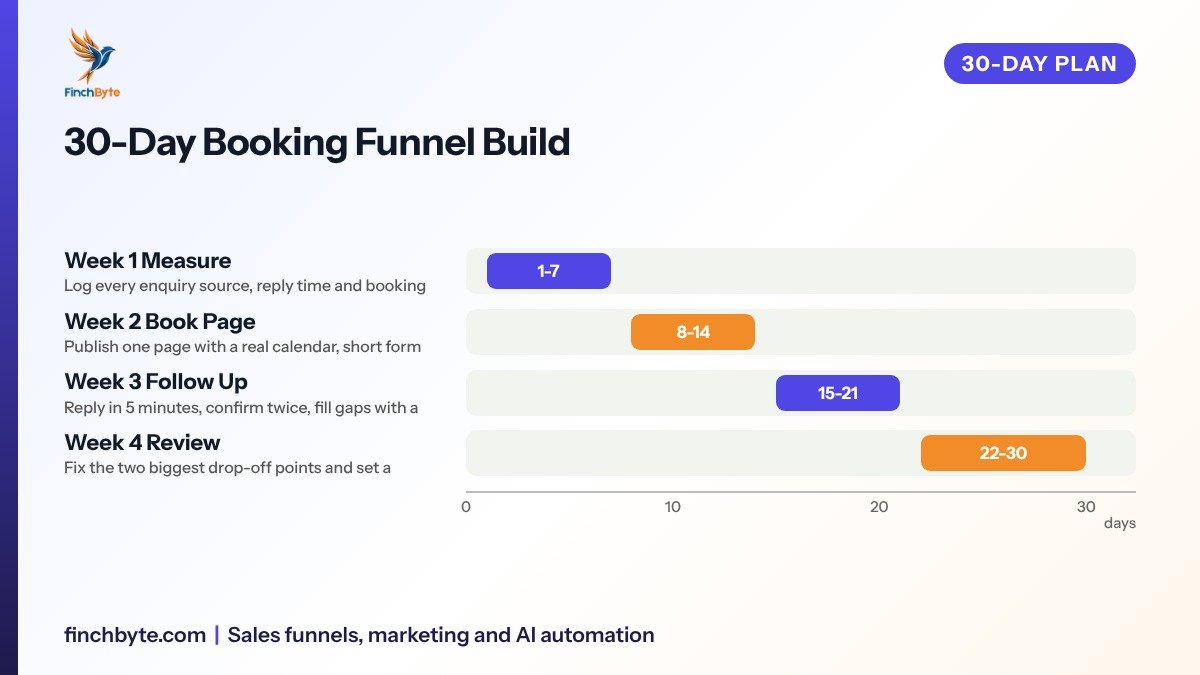
Week 1 feels slow and is the reason the other three work. Without the log you will guess at the wrong problem.
What the booking page must include
- Service and area in the headline. "Same-day dental check-ups in Scarborough" tells the visitor you are relevant and available.
- A real calendar or two-field form. Ask for name, mobile and preferred time only; every extra field costs bookings.
- Fees and insurance in plain words. A range or a "from" price stops calls that only wanted a price.
- Proof a patient can check. Doctor credentials, years of practice, and reviews that exist on Google rather than a claim.
- One number, one form, one WhatsApp. Three routes is enough, and each should land in the same place.
Speed-to-Lead Rules That Hold Without Extra Staff
Automation covers the first touch, people cover the judgement calls. Keep the split obvious.
- Automate the acknowledgement. A pre-written message that confirms receipt, states when a person will call, and includes the booking link.
- Automate confirmations and reminders. Two touches: one right after booking, one 24 hours before, with a one-tap way to reschedule.
- Automate the waitlist. When a slot opens, message three or four patients who asked for that time band rather than leaving the gap.
- Keep pricing and treatment questions human. A bot that guesses a fee loses trust; route those to the desk.
This is the same triage logic as a Lead qualification checklist: sort by urgency and fit, then hand the real conversations to a person. If you want the chasing handled without a bigger team, an AI automation setup can watch the inbox, log the enquiry, send the first reply and flag anything needing a clinician.
Confirm Twice and Fill the Gaps
A booking that nobody confirms is not a booking. Send a confirmation immediately with the date, time, address, what to bring and how to reschedule. Send a reminder 24 hours before, and a second one 2 hours before for first visits. Give one tap to confirm or move the slot; never make a patient call to cancel, because most simply will not, and you get a no-show with a hole in the day.
Then attack the gaps. Keep two or three flexible slots for the waitlist, and when a cancellation lands, message the waitlist before noon so the day refills. Track no-shows by day and time band; if Tuesday afternoons lose three of eight slots, that is a scheduling pattern, not bad luck.
Measure Bookings, Not Clicks
Your reporting should answer one question: how many enquiries became visits, and from where. Count a booking as confirmed when the patient attends or confirms, not when a form is submitted. A monthly report that a clinic owner can read in five minutes shows enquiries by source, reply time, bookings, no-shows and revenue by service line, which is the same view described in this Monthly marketing report.
Make sure the tool you use counts form fills, calls and WhatsApp messages as separate conversions but reports them as one booking number, the way you would set up GA4 lead tracking. Otherwise the ads platform optimises for cheap form fills while the calendar stays quiet.
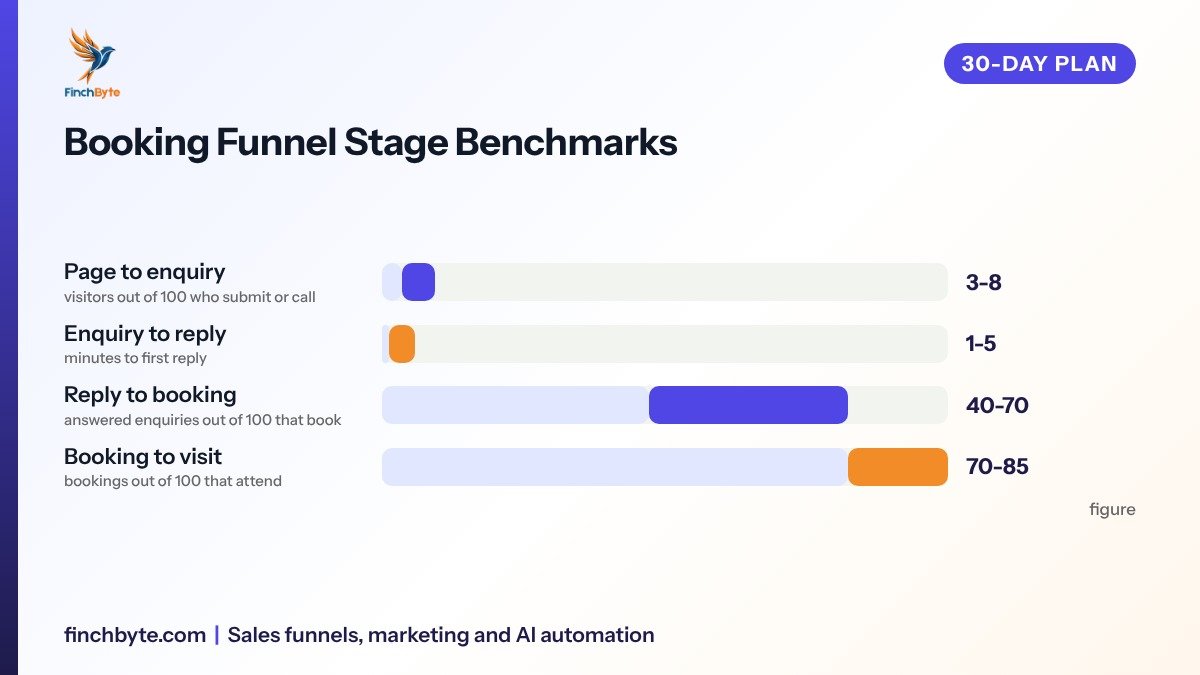
Read those four together. A strong page with a slow desk looks like a traffic problem; a fast desk with a weak page looks like an ads problem. The numbers say which one you have.
Common Mistakes to Avoid
- Sending ad traffic to the homepage. Visitors have to hunt for how to book and leave.
- Asking for too much in the form. Date of birth, medical history and address belong after the booking, not before it.
- Replying only when someone is free. The queue needs a clock, not goodwill.
- Confirming by phone only. Nobody remembers a verbal confirmation; a written one does.
- Counting form fills as bookings. Marketing reports success while the calendar stays empty.
- Letting one tool own everything. If the desk cannot see the enquiry, it will not be answered.
What to Ask Before Hiring an Agency
Ask who builds the booking page and who answers the first message, in writing. Ask what the monthly report contains and whether it shows reply time and confirmed visits, not just clicks. Ask who owns the scheduling tool, ad accounts, phone numbers and the enquiry log, and what happens to that data if you part ways. Ask for the timeline in weeks and what tracking gets set up before spend starts. A good agency will happily discuss the Funnel setup scope and hand over account ownership; one that avoids those questions is telling you something.
Conclusion
An appointment booking funnel for clinics is a short path with three habits: a page that books, a reply inside five minutes, and two confirmations that fill the day. Build it in 30 days, measure the four numbers above, and fix the two weakest steps each month.
Want this set up for your business? Book a free growth audit or Talk to Finchbyte.
Disclaimer: Results vary by business, market, budget and execution. This article is general guidance, not a promise of specific rankings, leads or revenue.
- #Appointment Booking Funnel for Clinics: A Week-by-Week Plan