Appointment Booking Page for Clinics: Stop Losing Patient Enquiries
A practical setup for an appointment booking page for clinics: the fields to ask, the confirmations and reminders to send, and the speed-to-lead rules that keep patient enquiries from going cold.
Finchbyte Team 9 min read
A patient finds your clinic at 9pm, taps "Book an appointment", picks Tuesday morning, and the calendar holds the slot. Nobody had to be awake to take it. Now picture the same patient a week earlier: they filled in a contact form, heard nothing until Thursday, and booked with the next clinic in their search results. An appointment booking page for clinics is the difference between those two stories.
This guide is for clinic owners, practice managers and the person who has quietly become responsible for marketing. It covers how to decide what belongs on a booking page, which fields to ask for, how confirmations and reminders should work, and how booked appointments and unbooked enquiries fit into one follow-up process. No made-up figures, no promises about rankings or attendance - just the setup decisions and how to review them.
Decide what a booking page should handle
Not every patient request should end in a self-serve booking. The first decision is which appointment types you are willing to let a stranger schedule without a conversation, and which ones need a human to look first.
Self-serve booking suits appointments with a known length, a clear price and no clinical judgement needed to schedule: a routine check-up, a hygiene visit, a vaccination, a follow-up review. It suits patients who already trust you and just want a slot. What it does not suit well is a first visit for a complex concern, a treatment that needs triage, or anything where the wrong booking wastes a clinician's chair time.
A useful rule: if the front desk would normally ask a question before confirming, keep it as an enquiry, not a booking. You can still route those requests to the same place, but a person reads them first. Our lead qualification checklist covers the same split from the qualification side.
Set the page around one decision
A booking page has one job: help a ready patient claim a time. Everything that competes with that job costs you completions. Keep the page short and let your service pages carry the detail.
- One headline that names the appointment. "Book a dental check-up in [city]" beats a vague welcome. The patient should confirm they are in the right place within a second.
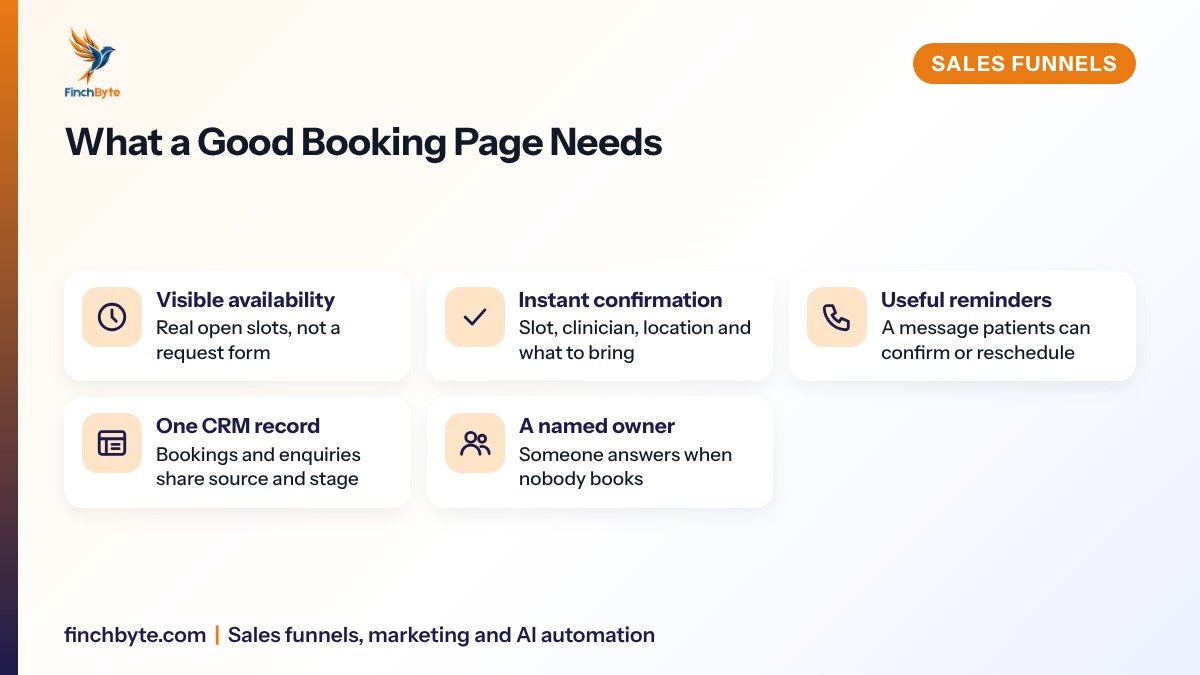
- Visible availability. Show open slots rather than a form that asks for three options and replies later. Uncertainty is the main reason a booking attempt is abandoned.
- The practical details near the button. Location, parking or transit notes, appointment length, what to bring, and whether there is a deposit.
- An exit for people who are not ready. A line such as "Not sure which appointment you need? Send us a question" keeps a hesitant visitor from leaving entirely. That link goes to your sales funnel setup enquiry path, not to a dead end.
Treat the booking page like a landing page for your clinic: one audience, one offer, one action, with the rest of the site available through the menu rather than cluttering the page.
Ask only the fields you need
Every extra question is a reason to stop. Ask for what the front desk genuinely needs to confirm and prepare the appointment, and move everything else to a confirmation call or a pre-visit form.
| Field | Why ask it | Keep it optional when | |---|---|---| | First and last name | Matching the booking to a patient record | Never required | | Mobile number | Confirmations, reminders and a handover call | Only if you have another working channel | | Preferred contact method | Fewer missed reminders | Rarely worth asking separately | | Appointment type | Sets duration, clinician and room | Never required | | Brief reason for visit | Tells the clinician to prepare | The patient is returning for a known issue | | Preferred clinician | Loyal patients book with a person | You have one clinician | | How you heard about us | Source reporting | The CRM already captures source |Two practical notes. Ask for a mobile number rather than an email if reminders work better by message, and check what you are collecting against your consent and privacy obligations under Canadian rules such as PIPEDA and CASL - collect less, store less, and be clear about how you will contact the patient. Our enquiry form design guide goes deeper on field order and wording.

Make confirmations and reminders useful
A booking that only exists in a calendar is a booking that will be forgotten. Confirmation and reminders are the part of an appointment booking page for clinics that most directly affects whether the appointment happens.
- Immediate confirmation. Same slot, date, clinician, location, and what to bring. Include a clear way to reschedule, because a rescheduled appointment is better than a no-show.
- A reminder at a sensible interval. Long enough for the patient to remember, short enough to be relevant. Send it at a time of day people read messages.
- A simple reply path. "Reply CONFIRM to keep this, or RESCHEDULE to pick another time" gives the front desk a list of who needs attention.
- A note for the clinician. The reason for visit and any pre-visit answers belong where the clinical team will see them, not only in the booking tool.
Keep message content factual and clinical-neutral. Reminders confirm logistics; they are not the place for treatment advice. If you use automated messages, keep a human handover obvious, as covered in our WhatsApp follow-up guide for clinics.
Give unbooked enquiries a speed-to-lead rule
Some visitors will not book. They start a booking and stop, or they use the "ask a question" route. That is where speed-to-lead matters: the enquiries that go unanswered are the ones your competitor answers first.
A speed-to-lead rule is simply a published commitment about who responds and how fast. For example, a clinic might commit to acknowledging every enquiry during opening hours within a short window, and to a first reply before the next business morning for anything that arrives overnight. The exact numbers are yours to set, but three things are not optional.
- Assign an owner. One named person or one shared queue with a rota is accountable for new enquiries. "Someone will see it" means nobody sees it.
- Define the response window. Write down the maximum time to a first reply for each channel: booking abandonment, web form, phone, message, walk-in follow-up. Put it where the front desk can see it.
- Put a next step on every record. No enquiry closes without a dated action: a call back, a booking link, a pre-visit form, or an honest "not now" with a review date.
- Handle abandoned bookings deliberately. Treat a started-but-unfinished booking as an enquiry, not as a technical failure. A short, helpful message offering two slots often finishes the job.
- Review the exceptions weekly. Every enquiry that sat longer than the window is a process finding, not a one-off. Fix the cause: staffing, routing, or a channel nobody monitors.
These rules belong in the same workflow you already use for follow-up. Our lead follow-up process guide shows how to write them as a sequence the team can actually follow.

Connect bookings to one pipeline
Booked and unbooked enquiries should look the same in your CRM: a record with a source, a stage, an owner and a next action. If bookings live only in the calendar tool, you cannot see how many enquiries never became appointments, and you cannot tell which campaigns or pages produced patients who actually attended.
Keep the stages short and honest. A clinic pipeline usually needs no more than: new enquiry, contact made, appointment proposed, booked, attended, and closed for a reason. "Closed" needs a reason code - chose another provider, no longer needed, unreachable, price, or not a fit - because those reasons are what you will act on later.
Set the pipeline up once and hold it steady rather than rebuilding it every quarter. Our CRM pipeline setup guide covers stage definitions and reason codes in more detail.
Measure the booking path, not just the page
Reporting on a booking page fails when it reports the page. The number that matters is how many people who needed an appointment ended up attending one. Assign the review to one owner and look at the whole path monthly.
| What to check | How to read it | Who owns it | |---|---|---| | Booking starts versus completions | A wide gap points to the form, the slots or the price question | Marketing lead | | Bookings by source | Which pages and campaigns produce booked patients | Marketing lead | | Time from enquiry to booked slot | The clearest speed-to-lead number | Front desk manager | | Confirmations and reminders delivered | Confirms the message path actually works | Front desk manager | | Attendance and reschedules | Judge alongside the reason codes, never alone | Practice manager | | Closed reasons on unbooked enquiries | Where you are losing people before a slot exists | Practice manager |Read the numbers as a sequence. Starts fall while completions hold, look at the form. Completions fall while starts hold, look at availability and price clarity. Completions hold while attendance falls, look at reminders and the booking-to-visit gap. If you use GA4, count bookings as the conversion event rather than clicks, as explained in our GA4 lead tracking guide. Keep the summary in the client portal or a short monthly report so the review takes minutes, not an afternoon.
Avoid these booking page mistakes
- Only one appointment type on the page. A patient who needs something else leaves instead of hunting for the right option.
- Too many fields. Optional detail on a booking form is the most common reason a started booking never finishes.
- Confirmation by email only. If patients read messages on their phone, an email-only path quietly loses attendance.
- No reschedule route. A patient who cannot change a slot easily simply does not come.
- Bookings that never reach the CRM. The calendar looks busy while the reporting says nothing.
- Speed-to-lead that depends on one person. One absence and the queue stops moving.
- Overbooking to cover no-shows. It trades a predictable gap for an angry waiting room and a damaged reputation.
Every enquiry needs an owner, a response window and a dated next step, including the ones that booked themselves.
Start with one appointment type
Pick your most-booked, least complex appointment, build one appointment booking page for it, and put speed-to-lead rules behind it. Watch starts, completions, time-to-book and attendance for a month, then extend to the next appointment type once the path is reliable.
Finchbyte builds booking and enquiry journeys end to end: the page, the fields, the confirmation and reminder messages, and the CRM pipeline that records every enquiry with its source and next step. See our sales funnel setup service, or request a free growth audit and we will map where your patient enquiries currently stall.
Frequently asked questions
Should a clinic use an online booking page or a phone-first enquiry process?
It depends on what patients are booking. Routine check-ups and simple follow-ups suit self-serve booking, while treatment decisions and sensitive cases usually need a conversation first. Many clinics run both: a booking page for standard appointments and an enquiry form for complex cases, with the same follow-up rules behind each.
How many fields should a booking page ask for?
Ask only for what the front desk needs to confirm or prepare the appointment: name, mobile number, preferred contact method, the type of appointment and a brief reason for the visit. Extra questions lower completion, so move anything optional into a confirmation call or a pre-visit form.
Does an appointment booking page replace follow-up?
No. A booking confirms a time, it does not confirm that the patient will attend or that an unbooked enquiry will be handled. Enquiries that start but never reach a confirmed slot still need an owner, a response window and a dated next action in the CRM.
What should we measure on a booking page?
Track the share of visitors who start a booking, the share who complete one, the time between an enquiry and a confirmed appointment, and attendance versus reminders sent. Review them together as one path rather than as separate form, page and attendance numbers.
Do booking reminders reduce no-shows?
Reminders give patients a reason to confirm or reschedule before the appointment passes, which is better than silence. The practical point is to send them at useful times, include a simple way to reschedule, and record every response in the patient record so the front desk sees the same picture.
Can a booking page work with our existing CRM?
Yes. The usual setup sends each booking into the CRM as a dated record with its source, so follow-up rules and reporting work the same way for booked and unbooked enquiries. If your current tool cannot record source and stage, that gap is worth fixing before you promote the page.
- #appointment booking page for clinics
- #patient booking
- #speed to lead
- #clinic marketing
- #sales funnel