Google Ads Budget Pacing: Stop Wasting Spend Mid-Month
Google Ads budget pacing explains why spend spikes early then stalls. Use this weekly check to smooth delivery and keep qualified leads coming all month.
Finchbyte Team 10 min read

What Google Ads Budget Pacing Actually Means
You check the account on the 12th and the numbers look great. Spend is ahead, leads are coming in, the phone has been busy. You check again on the 26th and nothing has moved for nine days. The ads stopped showing, the cheap leads stopped arriving, and a competitor who spent the same monthly total ran every single day.
That gap is a pacing problem, not a campaign quality problem. Google Ads budget pacing is how evenly your daily spend is delivered across the month, and most small accounts get it wrong in one of two directions: they front-load spend and go dark early, or they set budgets so low that delivery never gets going. This guide covers how Google's delivery system behaves, how to read your own pacing on a weekly cadence, and the specific fixes for the four pacing patterns that show up most often in service, B2B and e-commerce accounts.
Standard versus accelerated delivery
Standard delivery spreads spend across the hours and days when your campaign is most likely to convert. Accelerated delivery shows ads as fast as the budget allows, which is useful for a short promotion window and a poor default for a lead campaign running all month. Most accounts should be on standard delivery, and the first pacing check is simply confirming that is what is actually set at campaign level.
Why Spend Spikes Then Stalls
Delivery is not evenly distributed by default, and the reasons are worth knowing because each one needs a different fix.
- Auction pressure moves week to week. Your cost per click rises when more advertisers compete for the same query, so the same budget buys fewer clicks in a busy week than a quiet one.
- Monthly budgets are charged as daily averages. Google can spend up to twice your daily amount on a heavy day, then under-spend on a slow one, as long as the monthly total holds. That is normal, and it is what makes a single day look alarming.
- Learning phase throttles new campaigns. A new campaign or a fresh conversion setup limits delivery while it gathers data, so early spend looks cautious and then jumps once it exits.
- Automated bidding chases the target. If a target CPA is set below what the account can realistically achieve, the system bids down and delivery collapses rather than overspend.
- Scheduled or seasonal demand. Query volume for many services peaks in the first week of the month and again mid-month, so spend follows the search curve instead of the calendar.
A typical scenario makes this concrete. Say a clinic runs a $1,500 monthly budget on lead campaigns. By day 10 it has spent $800 because costs were high and volume was strong. By day 19 the budget is exhausted, ads serve intermittently for the rest of the month, and the last 11 days produce almost nothing. The month looks profitable in the aggregate while quietly giving away three weeks of demand to whoever else was still bidding.
Read Pacing Before You Change Anything
Pacing is a simple comparison of dollars, and most owners have never done it. Add up the spend so far and compare it against the share of the month that has passed. If you have used most of the budget by the third week, you are running hot. If only a little of it has gone by the third week, delivery is being throttled somewhere.
Do this on a fixed day each week so you are comparing like with like rather than reacting to a bad Tuesday. Monday morning works well because the weekend is complete and the week ahead is still adjustable.
- Pull the daily spend view. In Google Ads, open Reports, then Predefined reports, then Daily. Keep the date range to the current month only.
- Compare spend to the calendar. Divide spend so far by the monthly budget, then compare that with how far through the month you are. The gap between the two is your pacing variance.
- Split the variance by campaign. One campaign usually causes the whole drift. Look at spend per campaign, not just the account total.
- Check cost per click and impression share side by side. Rising cost per click with falling impression share means competition, not a settings problem.
- Read leads per day, not leads per month. A month that produced 60 leads in 18 days is a different problem from 60 leads spread over 30 days.
- Note the lost impression share by budget. That column tells you directly whether a capped budget is costing you available auctions.
If the account total looks fine but one campaign is doing all the work, that is a structure issue rather than a pacing one, and the fix sits in GA4 lead tracking: measure enquiries without counting clicks as leads territory rather than in budgets.
The Four Pacing Patterns and Their Fixes
Most pacing problems fall into one of four shapes. Naming the shape first saves a week of trial and error, and each needs a different lever.
| Pattern | Budget spent by day 12 (dollars on a $1,000 budget) | Typical cause | First fix |
|---|---|---|---|
| Front-loaded | 550-650 | Accelerated delivery or high early cost per click | Switch to standard delivery, trim top bids |
| Stall | 300-400 | Target CPA set too low | Raise the target or switch to maximise conversions |
| Stop-start | 400-500 | Daily budget below 5-10x average cost per click | Raise the daily budget or narrow to high-intent keywords |
| Under-spent | 500-600 | Narrow targeting or low search volume | Broaden keywords, add locations, review bids |
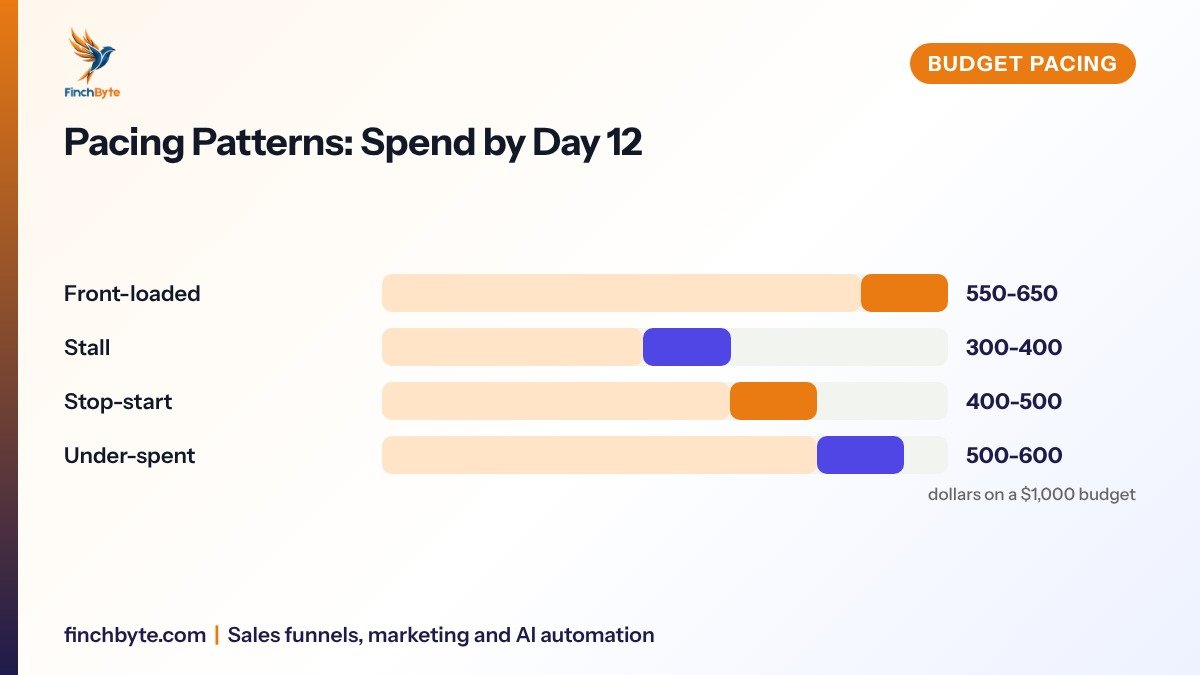
Front-loaded is the most common in accounts that were set up quickly. The stall pattern is the most damaging for lead generation, because the account is technically healthy while serving almost no ads. Stop-start delivery is the quietest leak: your ads are simply not present for half the day, and you only notice when a competitor mentions they are "everywhere". Under-spent accounts usually have a bidding constraint rather than a demand problem, and owners often respond by cutting budget further, which makes it worse.
Spend that arrives evenly is worth more than spend that arrives early, because leads have a short shelf life and demand does not stop on day 19.
A Weekly Pacing Check That Takes Ten Minutes
The check below is what a managed account should be running whether or not anyone is employed to watch it. It is deliberately short. Anything longer does not get done.
- Confirm the monthly budget and the day number. Write both down before opening the account so the arithmetic is honest.
- Read spend so far and compare it to the calendar. Flag any campaign that is clearly ahead of or behind where the month stands.
- Look at lost impression share by budget on the top two campaigns. If it shows a meaningful number of auctions lost to budget, a cap is costing you available demand.
- Check leads and cost per qualified enquiry by week, not by month. A week that cost twice as much per lead needs a reason before you touch bids.
- Make one change only. Bid, budget, or targeting. Two changes at once and the following week tells you nothing.
- Log the change with the date. A two-line note per week turns a confusing quarter into a readable one.
Pair this with a proper naming convention so the weekly report separates paid from organic without anyone rebuilding formulas. UTM tracking for small businesses: connect campaign links to better lead reports covers the naming side, and the reporting side sits in Monthly marketing report: what a small business owner should see.
How Pacing Changes by Channel
The same monthly budget behaves differently depending on where it is spent, and owners who apply one pacing rule to everything end up fighting the wrong system.
- Google Search responds quickly to budget and bid changes, often within 24-48 hours, which makes it the easiest channel to correct mid-month.
- Performance Max redistributes spend across its inventory on its own schedule, so a single day means very little and a 14-day window is the minimum you should judge it on.
- Meta Ads needs roughly 50 conversion events per ad set per week before delivery stabilises, so a budget too thin to reach that threshold stalls regardless of settings.
- LinkedIn Ads carries a much higher cost per click, so a small monthly budget runs out fast and delivers in short bursts unless the audience is narrowed.
- Retargeting spends late in the month if your traffic is front-loaded, because the audiences only fill after people visit.
If you are weighing paid against organic for the same budget, the trade-offs are laid out in SEO vs Google Ads for Ontario small businesses. For lead campaigns specifically, pacing matters more than the total, because a lead contacted on day 27 is worth far more than the same lead contacted on day 4. That is where follow-up speed meets budget: see Lead follow-up process: from enquiry to useful conversation.
When to Move Budget Mid-Month
Reallocating mid-month is normal and low risk if you do it in one direction at a time. The instinct to wait until month end costs you the rest of the month.
- Move spend out of a campaign that stalls. If one campaign has been flat for 7 days while another is capped by budget, shift part of the daily budget to the capped one.
- Move spend out of a campaign with no qualified leads. Volume without qualified enquiries is not a pacing issue, it is an offer or targeting issue, and more budget will not fix it.
- Never cut a campaign below 5x its average cost per click per day. Below that, delivery becomes intermittent and results stop being measurable.
- Do not reset a learning campaign. Reallocating a campaign that is still learning restarts the learning phase, so leave it alone until it has enough conversions.
- Add budget in the first week, not the last. Extra spend added in week four buys the most expensive auctions of the month.
A useful rhythm is to review on days 7, 14, 21 and 30. Day 7 catches a front-loaded account while most of the month is still adjustable. Day 14 is where most reallocation decisions should be made. Day 21 is for damage control only. Day 30 is for the readout, not for changes.
What to Ask Before Hiring an Agency
Pacing is one of the easiest things to get wrong and one of the easiest to verify, so it belongs in your agency review.
- Scope. Ask which campaigns and channels are actively monitored between reports, and how often budgets are reviewed.
- Reporting. Ask to see a report that shows spend, qualified enquiries and cost per qualified enquiry by week, not just monthly totals.
- Ownership. Confirm your conversion goals, audiences and campaign history stay in your own account if you leave.
- Timelines. Ask what triggers a mid-month change and how quickly it is made after a campaign stalls.
- Tracking. Ask how paid leads are separated from organic ones, and how phone calls are counted. If nobody can answer that clearly, the pacing numbers you are being shown are unreliable.
You can see how Finchbyte structures this kind of account oversight on the Digital marketing services page, or start with a Free growth audit to check your current setup against the checklist above.
Common Mistakes to Avoid
- Judging pacing on a single day. One expensive Tuesday is not a trend; use a 7-day window at minimum.
- Reacting to cost per click instead of cost per qualified enquiry. A high click cost that produces booked meetings is not a problem.
- Leaving accelerated delivery on a month-long lead campaign. It drains budget in the cheapest hours and leaves nothing for the rest of the week.
- Cutting budget on an under-spending campaign. The constraint is usually bids or targeting, so cutting budget only shrinks what little delivery you had.
- Changing bids and budgets in the same week. You will not know which change caused the movement.
- Ignoring lost impression share by budget. It is the clearest signal that a capped budget is costing you auctions you would have won.
- Forgetting the month-end cliff. If spend always collapses in the final week, you are handing three weeks of demand to competitors.
Conclusion
Google Ads budget pacing is a five-minute weekly habit that protects the value of everything else you spend. Compare your spend to the calendar, name the pattern, change one lever, and review on days 7, 14, 21 and 30 so your campaigns serve every day of the month rather than the first half of it.
Want this set up for your business? Book a free growth audit or Talk to Finchbyte.
Disclaimer: Results vary by business, market, budget and execution. This article is general guidance, not a promise of specific rankings, leads or revenue.
Frequently asked questions
What is Google Ads budget pacing?
It is how evenly your monthly budget is delivered across the days of the month. Good pacing means your ads serve every day at a steady cost per click. Poor pacing means spend arrives in a burst and then stops, leaving part of the month with little or no delivery.
Why did my Google Ads stop serving mid-month?
The usual reasons are a daily budget that is too small for your average cost per click, a target CPA set below what the account can achieve, or a monthly budget that was spent too quickly in the first week. Check lost impression share by budget first, because it tells you directly whether a cap is the cause.
What is a healthy pacing ratio?
Spend so far should track the calendar closely, ideally within about one week of where the month stands. If you are on day 21 and have already used most of the budget, you are running hot and will likely go dark before month end.
Should I use standard or accelerated delivery?
Use standard delivery for campaigns that run all month, especially lead generation. Accelerated delivery is only sensible for a short promotion with a fixed end date, because it spends as fast as possible rather than waiting for better-performing hours.
How often should I check pacing?
Once a week on the same day, plus a fuller review on days 7, 14, 21 and 30. Daily checking leads to changes that cancel each other out, and monthly checking means you find a stall three weeks after it started.
Can Google spend more than my daily budget?
Yes. Google can spend up to twice your daily average on a heavy day and less on a quiet one, while keeping the monthly total at 30 times your daily budget. That is why a single high-spend day is rarely a real problem.
Does pacing matter for Meta and LinkedIn too?
Yes, but the thresholds differ. Meta ad sets generally need around 50 conversion events per week to deliver steadily, and LinkedIn's higher cost per click means a small budget runs out in short bursts. Judge Meta over 7 to 14 days and LinkedIn by qualified enquiries rather than clicks.
- #Google Ads budget pacing