Meta Lead Forms vs Landing Pages: A Lead Quality Test
Compare Meta lead forms with landing pages on cost, quality and follow-up speed, then set up tracking so your report shows real enquiries, not form taps.
Finchbyte Team 9 min read

Your Meta report says you bought 60 leads this month at a cost per lead you are happy with. Then the sales team tells you only nine of them answered the phone. That gap between form taps and real conversations is where the argument between native lead forms and landing pages actually lives, and it is worth settling with numbers rather than preference.
This guide compares Meta lead forms vs landing pages on the things that decide the answer: cost per lead, how many leads turn into a real conversation, and how fast you can reply to them. It also covers the tracking you need so your report counts enquiries instead of taps, and a simple two-week test to settle it for your own business.
What Each Option Actually Does
A native lead form opens inside Facebook or Instagram. The name, email and phone number fields arrive pre-filled from the person's profile, so they confirm and send without ever loading your site. That is why the volume looks good: fewer steps, fewer people lost on a slow page.
A landing page is a separate page you build and host, reached by clicking the ad. The visitor types their own details, which takes longer and costs you some of them along the way. What you get back is control: your own form questions, your own page speed, and a conversion you can measure in GA4 the same way you measure the rest of your site.
The trade is straightforward. Forms buy you volume and cheap taps. Pages buy you intent and cleaner data. Which one wins depends on what your team can handle after the lead arrives, which is the part most campaigns never plan for.
Why Cheap Leads Quietly Cost More
A lead that never answers is not a cheap lead. It is a cost with nothing attached. Say your clinic spends 1,500 CAD a month on Meta Ads. A native form brings in 75 leads at 20 CAD each, and 20 of those 75 are worth a call, so each useful enquiry cost you 75 CAD. A landing page route at 40 CAD a lead that produces 20 useful enquiries out of 40 also lands at 75 CAD each, and the sales team spent half its time on people who never intended to book anything.
This is why cost per lead on its own is a weak number to manage a budget by. The number that matters is cost per qualified enquiry, and it only becomes visible once your ad platform knows what happened after the form. That is the same problem solved in GA4 lead tracking and in Offline conversion import for Google Ads, where the CRM outcome is sent back to the ad account so the algorithm optimises for conversations rather than submissions.
Cost per Lead Is Only Half the Number
Run both options for a fortnight on the same audience and the same creative, and a pattern shows up almost every time. Native forms come in cheapest per submission. Landing pages cost more per lead and deliver more leads that are worth calling.
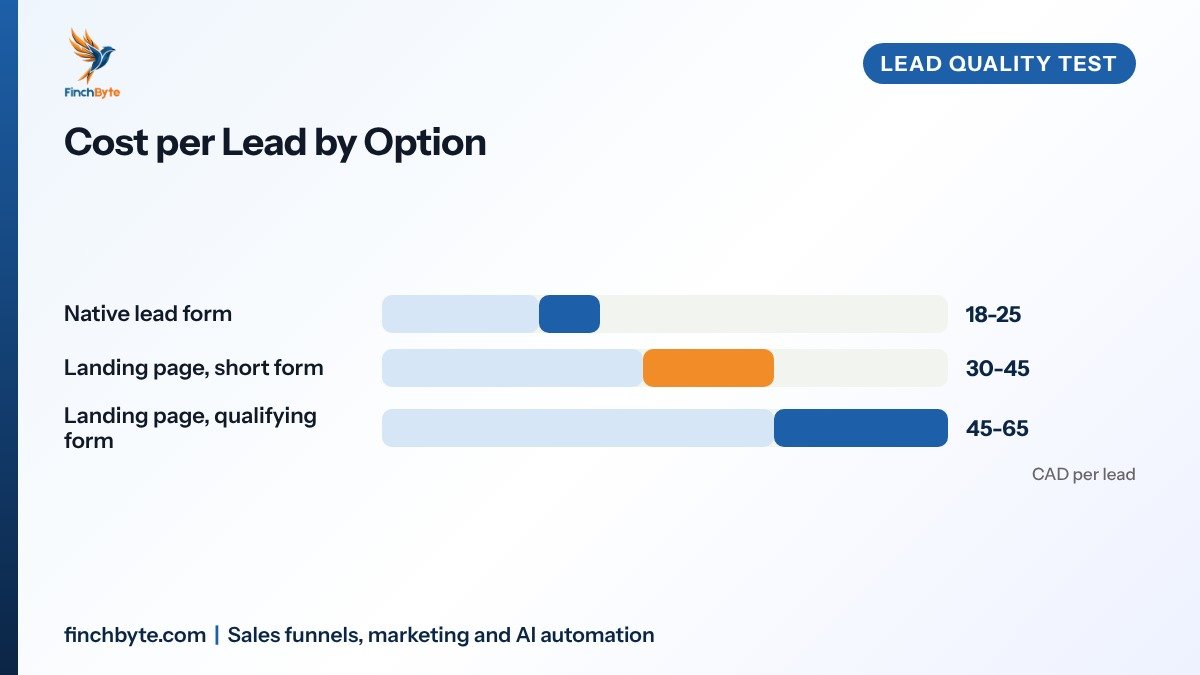
The same three options look very different when you count the leads that reach a real conversation instead of the price you paid for them.
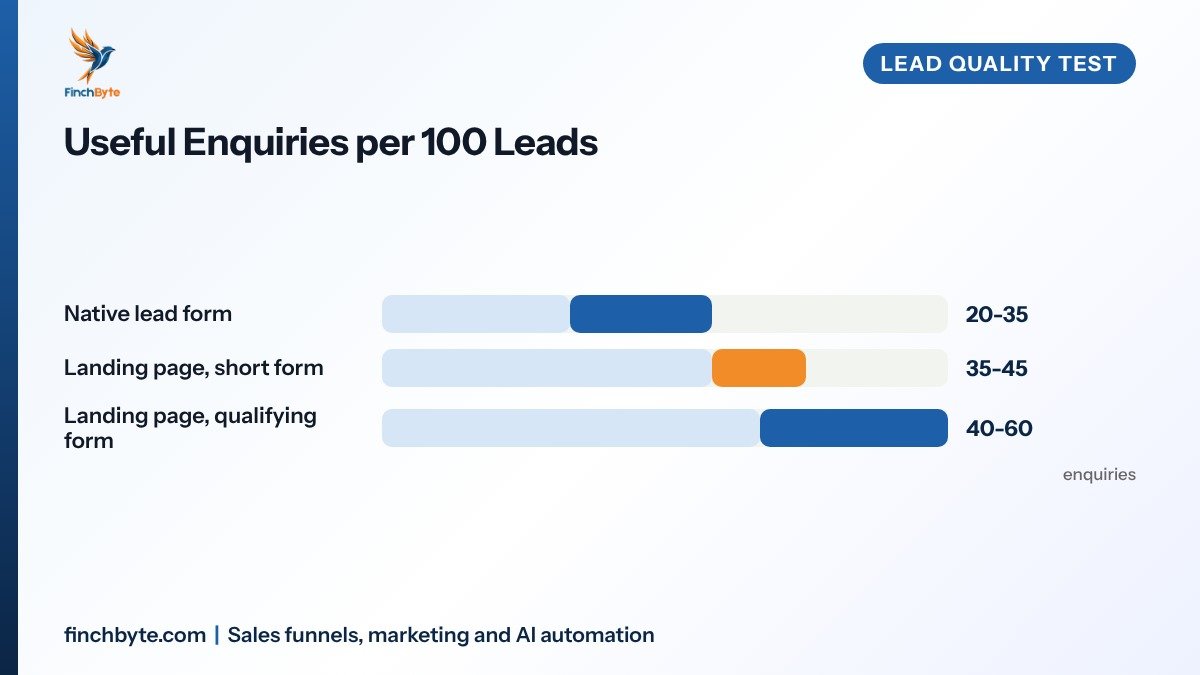
Read the two together and the cheap option stops looking cheap. A qualifying form that asks what the person needs, when they want to start and what budget range they are in will lose volume on purpose. You are paying more per lead to filter out the ones your team would waste a call on. These ranges are illustrative for a small service business. Your own numbers come from the test below, not from a benchmark table.
Speed to Lead Decides Most of This
Whichever format you choose, the enquiry is worth the most in the first few minutes. A person who just asked about dental implants is available now, and is far harder to reach tomorrow evening.
Native forms push leads into a CSV export or a CRM integration that often runs on a delay. A landing page submission can fire a workflow the second it happens: instant email and WhatsApp to the lead, a task in the CRM, and a ring from the team. That is a real advantage for the slower, more deliberate option, and it is the reason a smaller number of better-timed conversations beats a bigger list nobody called.
If your team replies in batches once a day, that erases the difference between the two formats and quietly wastes budget either way. Automated first contact and routing is what makes the volume from a lead form usable at all, and it is the piece Our lead follow-up process guide walks through step by step.
Where Tracking Breaks Between the Two
This is the part that makes reports untrustworthy, so it is worth getting right before you spend anything.
A native lead form never touches your website. There is no page for GA4 to record, so the conversion is invisible to your site analytics unless you pull it out of Meta and match it. People who rely on the raw lead count in Ads Manager end up reporting taps as enquiries, and the number never agrees with what the CRM holds.
A landing page submission is easy to measure, provided it is set up as a real event and not a page view. Send it to GA4 as a configured event, tag the ad link properly, and the enquiry shows up in the same report as your other channels. The naming rules in UTM tracking for small businesses are what keep the two sources from collapsing into one unhelpful row.
If a lead never appears in the same report as the money you spent on it, you are guessing at what to scale.
One legal note worth stating plainly: pre-filled contact details are personal information. Under rules like CASL and PIPEDA in Canada, the DPDP Act in India or GDPR for EU contacts, you still need a clear consent step and a real privacy policy on the form, and you need to tell people how you will contact them. That is general guidance, not legal advice.
How to Test Both in Two Weeks
- Agree the definition first. Write down what counts as a qualified enquiry (a reachable person, in your service area, with a real need) and make the whole team use it. Everything else depends on this line.
- Split the budget evenly. Run a native lead form campaign and a landing page campaign against the same audience, same creative and same offer for 10-14 days, with no changes mid-test.
- Tag both so they stay separate. Use distinct UTMs on the landing page link, and set up a lead sync or webhook for the native form so both land in the CRM with the source written on the record.
- Score every lead the same way. Mark each one qualified, call-back needed or junk within 48 hours, so the outcome field is filled for both campaigns.
- Compare cost per qualified enquiry. Divide spend by qualified enquiries, not by submissions. That is the only number that settles the argument.
- Send the outcome back to Meta. Feed qualified enquiries into the ad account as conversions so the delivery system starts finding more of the people who actually convert.
Two weeks is usually enough to see a clear direction on a modest budget. If both campaigns bring fewer than 20 leads each, run it longer rather than trusting the first week.
Which One to Pick by Business Type
For a clinic or a real estate team relying on volume and fast callbacks, native forms work well when the follow-up is automated from the first minute. The volume is real, and the junk is manageable if speed is real too.
For B2B and manufacturing enquiries, a landing page with qualifying questions is usually the better use of budget. A buyer asking about a machine specification needs a proper brief, not a two-tap form, and a page lets you set expectations about lead times and pricing before anyone raises a hand. The same logic applies to the journeys in our B2B lead generation guide for manufacturers.
For e-commerce and local retail, the answer is often both at once: forms for a low-commitment offer like a catalogue or a store visit, and a page for anything needing a booking or a quote. Whichever you choose, the page itself should follow the practical rules in our Landing page design guide, including a form that asks only what your team will actually use.
Common Mistakes to Avoid
- Judging on cost per lead alone. A low price per submission hides a high price per conversation, which is the number your budget should follow.
- Running both without separate tags. Shared UTMs merge the two sources into one row, and the test tells you nothing you can act on.
- Skipping the consent line on a pre-filled form. Auto-filled details still need a clear consent tick and a link to your privacy policy.
- Letting leads sit until tomorrow. A reply the next evening loses most of the value, whatever format collected the enquiry.
- Building a long form on a slow page. Every extra field and every extra second of load time costs you a share of the people who were ready to enquire.
- Changing the offer mid-test. New creative or a new offer halfway through makes both sets of numbers impossible to compare.
What to Ask Before Hiring an Agency
If Meta Ads sit with an agency, ask these five things before signing anything. Get clear scope on who builds the form or page and who writes the follow-up messages. Ask what the monthly report will show, and insist it reports qualified enquiries rather than leads collected. Confirm in writing that you own the ad account, the page, the CRM records and the audience data. Get the setup timeline and the date of the first review agreed in writing. And ask specifically how native form leads are synced into your CRM and how the outcome is sent back to the ad account, because that one answer tells you whether the reporting will be honest. Our guide to What a monthly marketing report should show is a useful checklist for that conversation.
Conclusion
Meta lead forms vs landing pages is not a preference question. Forms buy volume and a low price per submission, landing pages buy intent and cleaner measurement, and the winner is whichever produces more qualified enquiries per dollar once your follow-up speed is factored in. Run the two-week test, measure cost per qualified enquiry instead of cost per lead, and let that number decide where the budget goes.
Want this set up for your business? Book a free growth audit or Talk to Finchbyte.
Disclaimer: Results vary by business, market, budget and execution. This article is general guidance, not a promise of specific rankings, leads or revenue.
Frequently asked questions
Are Meta lead forms cheaper than landing pages?
Usually yes per submission, because the form pre-fills the visitor's details and there is no page to load. The saving disappears if a large share of those leads never answer a call, so compare cost per qualified enquiry rather than cost per lead.
Why do my Meta lead counts not match my CRM?
Native lead forms never touch your website, so GA4 cannot see them. The counts differ because of sync delays, duplicate records and people who submitted by mistake. Set up a lead sync or webhook into your CRM and reconcile the two weekly, using distinct UTMs on any landing page link.
Can I run both lead forms and landing pages at the same time?
Yes, and for most businesses that is the best test. Split the budget evenly, keep the audience, creative and offer identical, and tag each route separately. After 10-14 days compare cost per qualified enquiry, not the raw lead totals.
How fast do I need to reply to a lead from either option?
Under five minutes is the practical target for an enquiry that came from an ad. A landing page can trigger that instantly through a workflow. A native form needs a working CRM integration to do the same, otherwise leads sit until someone exports a file.
Do pre-filled Meta lead forms create privacy problems?
They hold personal information, so you still need a clear consent step, a link to your privacy policy and a statement of how you will contact the person. Rules such as CASL and PIPEDA in Canada, the DPDP Act in India and GDPR for EU contacts apply to how you store and use those details. This is general guidance, not legal advice.
Which option is better for B2B and manufacturing leads?
A landing page with qualifying questions usually wins for B2B, because you need the buyer's application, quantities and timeline before the enquiry is useful. Native forms suit high-volume, low-commitment offers where speed of callback does the filtering.
- #Meta lead forms vs landing pages