Offline Conversion Import for Google Ads: Match Calls to Ads
Offline conversion import for Google Ads sends closed calls and CRM deals back to your campaigns, so bidding chases revenue. Here are the setup steps.
Finchbyte Team 9 min read
Your Google Ads report says 42 conversions this month. Your CRM says 9 of those enquiries turned into booked jobs, and three of the campaigns that produced the most form fills produced none that you would take. The account is optimising for the wrong thing, and no amount of bid tweaking will fix it, because Google has never been told what happened after the form was submitted.
That gap is what offline conversion import closes. It sends the outcomes your team already records in a CRM or call log back into Google Ads, so Smart Bidding learns from revenue rather than from button clicks. This guide covers what counts as an offline conversion, the two ways to get the data in, the setup in order, how long to wait before judging it, and what to check when the numbers look wrong.
What Offline Conversion Import Actually Means
An offline conversion is any meaningful action that happens away from your website: a phone call you logged, a consultation that was booked, a quote that turned into a signed contract, a store visit that ended in a sale. The lead arrives online, usually from an ad click, and the outcome is recorded somewhere else.
Offline conversion import is the mechanism that connects the two. You keep a record of which Google Click ID (gclid) landed on each lead in your CRM, then send back a line saying "this click, at this time, reached this stage on this date." Google matches the click ID to the ad interaction and credits the campaign, keyword and ad that earned it.
The value is not a prettier report. Once those outcomes are counted as conversions, Smart Bidding strategies such as Target CPA and Maximise Conversion Value start bidding toward the leads that actually close. In a lead-generation account, that is usually the difference between a campaign that looks busy and one that pays for itself.
For a full picture of what Google can and cannot see on its own, our GA4 lead tracking guide covers the on-site half of the same problem.
Calls, Booked Meetings and Signed Deals: What Counts
Not every CRM field belongs in an ad account. Importing too many stages dilutes the signal, and importing too few leaves the algorithm guessing. Pick the stage your sales team agrees is a real opportunity, and keep it stable.
| Outcome | Typical lag to result (days) | Upload frequency | Use as |
|---|---|---|---|
| Phone call connected over 30 seconds | 0-1 | Daily | Primary conversion |
| Consultation booked in CRM | 1-3 | Daily | Primary conversion |
| Qualified opportunity created | 3-14 | Every 7 days | Secondary conversion |
| Signed deal value recorded | 14-90 | Every 7 days | Conversion value only |
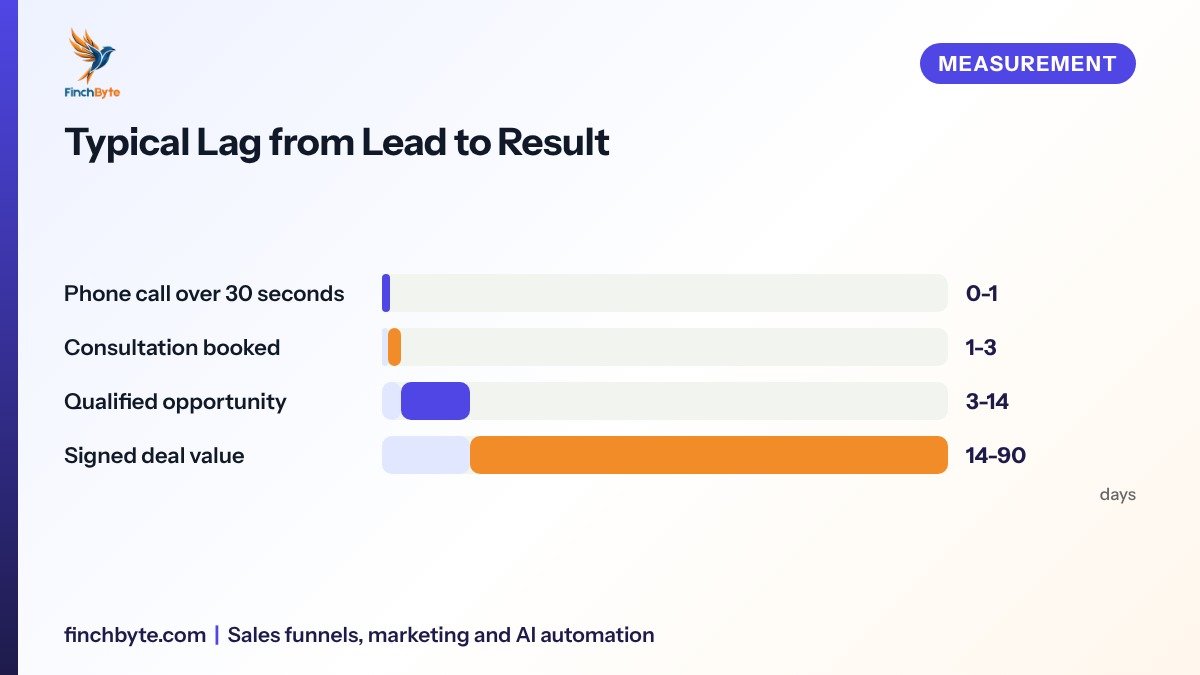
The first two rows are the ones most lead-generation accounts should import first. They arrive fast enough that bidding can react within a week, and your team already records them. Qualified opportunity is worth adding once the first two are stable. Signed deal value carries the true revenue signal, but with a 14-90 day lag it should never be the only thing a bidding strategy is chasing in a small account.
A useful rule: if the stage appears on fewer than about 10 actions a month, do not make it your primary conversion. The volume is too thin for bidding to learn from, and you will read noise as a trend.
Click IDs, CRM Fields and the Data You Need First
Before touching any setting in Google Ads, check whether your stack can even carry the match. This is where most stalled projects die.
Three things must exist:
- Click ID capture. Your landing page and form must store the
Gclid(orWbraidfor some iOS traffic) alongside the lead. If your form tool drops unknown URL parameters, the ID never reaches the CRM and nothing downstream works. - A CRM record with that ID and a stage field. Each lead needs the click ID, the date of the click, and a stage your team updates when the outcome is known.
- Someone who updates stages. Offline import only reflects reality if the sales team actually moves records. A CRM where half the leads sit in "New" for a month will feed Google bad data.
If you use a call-tracking number, the call log supplies the match instead of the form, and you need the call reference tied back to the click. Our UTM tracking guide explains how to keep source and campaign naming consistent so the imported rows line up with your other reporting.
Write down your current numbers before you change anything: leads per month, booked meetings per month, and the close rate on each campaign. Those baseline figures are how you will know the import worked.
The Setup, Step by Step
- Create the offline conversion action. In Google Ads, go to Measuring and reporting, then Conversions, and add a new conversion with an import type of your CRM or another offline source. Set it to count as a conversion, not a secondary one, and set the scope to lead generation.
- Set the conversion window. Choose how long after a click you will still report an outcome. For services with a short sales cycle, 30 days is honest. For higher-consideration B2B deals, 60-90 days is more realistic. Anything longer than your real cycle imports events Google cannot reliably attribute.
- Add the click ID to your lead record. Confirm your form or call-tracking tool passes
Gclidinto a CRM field. Test it with a real ad click rather than trusting the integration notes. - Map stages to conversion names. Decide which CRM stage fires a conversion and which only fires a value. Keep one primary stage. If both "meeting booked" and "deal won" count as conversions, you will double-count the same customer.
- Build the upload. Either connect your CRM through a Conversion API or CRM integration, or export a CSV with the click ID, conversion name, conversion time and optional value, and upload it manually.
- Schedule it and keep the cadence. Automated uploads should run daily or every 7 days. Manual CSVs need a calendar reminder, because an import that happens "when someone remembers" makes every report unreliable.
Use UTC or your account timezone consistently in the conversion time field. A timezone mismatch is the most common reason imported conversions land on the wrong day and appear to have vanished.
Uploading by CSV, CRM Sync or Call Recording
Three routes get the data in. The right one depends on volume and on who owns your CRM.
| Method | Best for | Effort to run |
|---|---|---|
| Manual CSV upload | Accounts under 30 leads per month | 10-20 minutes weekly |
| CRM integration or sync | 30-300 leads per month | One-off setup, then automatic |
| Call recording import | Phone-first businesses such as clinics and trades | One-off setup, then automatic |
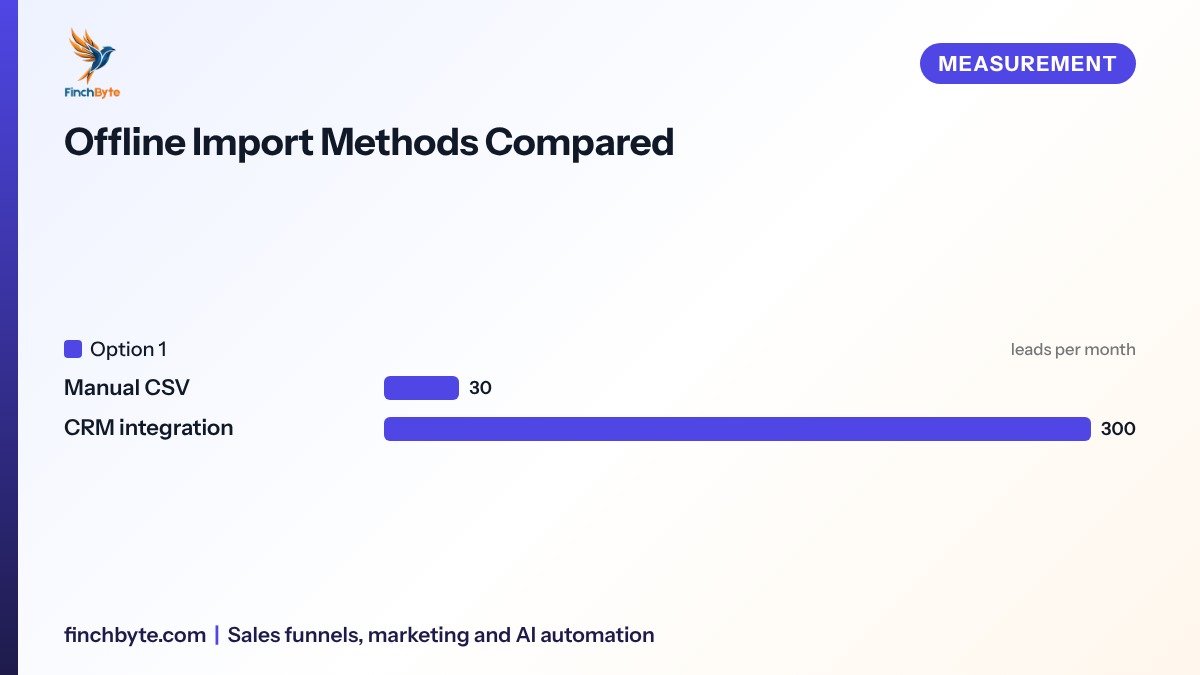
Manual CSVs are fine to start with, and honestly a good way to prove the concept in week one. They break down around 30 leads a month because someone eventually skips a week. A CRM sync is the version you want at scale: the same export that your sales team uses for their own pipeline becomes the ad feed, so there is one source of truth. Call recording import suits businesses where the phone is the conversion, since the call log already holds the click ID and the call duration without anyone typing anything.
Whichever you pick, document it somewhere your team can find. An undocumented upload process disappears the first time the person who built it leaves.
What Changes in Reporting and Bidding
Once outcomes flow in, expect the numbers you are used to to move, and understand why before a stakeholder asks.
Imported conversions are attributed to the Date of the click, not the date of the upload. So a campaign that looked strong last week can lose conversions when last week's leads close today and get backdated. Reports will look incomplete for the length of your lag, then quietly improve. Set your expectations, and your dashboard labels, around that.
Bidding is the real change. Target CPA stops optimising for cheap form fills and starts chasing the profile of clicks that led to booked meetings. In practice, the cost per form fill often rises while cost per booked meeting falls, which surprises people who are watching the wrong column. Judge the account on cost per qualified opportunity and on pipeline, not on the form.
Conversion value from signed deals get value-based strategies, but only if your values are real. If every deal is entered as the same number, value-based bidding has nothing to work with. If your average deal varies a lot by service line or city, importing values is where the biggest gains usually are.
For how to present all of this to the person signing off on spend, see our Monthly marketing report guide.
Report the outcome, not the click, and the bidding finally has something honest to aim at.
Common Mistakes to Avoid
- Importing every CRM stage as a conversion. Count one stage and treat the rest as values or secondary, or the same customer is counted several times.
- Turning off on-site form tracking too early. Keep the form conversion running for a few weeks so you can compare the two counts and trust the new one.
- Letting stage updates slip. If the sales team stops updating records, the import reports a false decline that looks like a media problem.
- Choosing a conversion window longer than the real sales cycle. A 120-day window on a 7-day service cycle imports matches Google cannot verify.
- Judging the account before the lag has passed. Compare a month to the same month a full cycle later, not to last week.
- Uploading leads without a click ID. Rows with a missing or malformed
Gclidare rejected silently, and the totals look thin with no obvious cause.
One privacy note worth stating plainly: you are sending your own customer data to an ad platform. Confirm you have consent to market to those contacts and that your privacy policy covers it, under CASL and PIPEDA in Canada or the DPDP Act in India. This is general guidance, not legal advice, so run it past whoever owns compliance for your business.
What to Ask Before Hiring an Agency
Offline import touches your CRM, so ownership questions matter more here than in most campaigns.
- Scope. Ask exactly which stages will be imported, which count as conversions, and who decides that mapping.
- Reporting. Ask to see a report that shows imported conversions by campaign alongside pipeline, not just ad platform totals.
- Ownership of accounts. Confirm the conversion actions and the CRM integration live in accounts you control, so nothing is lost when the engagement ends.
- Timelines. Ask how long they expect the setup to take and what has to be true in your CRM before they start.
- Tracking and validation. Ask how they will prove the match rate, and what they will do if it falls below what your volume should produce.
If an agency cannot explain the click ID path in plain words, the project will stall at the CRM step regardless of how good their media work is. Finchbyte's Performance marketing services are measured on qualified leads and revenue rather than clicks, and our Sales funnel setup covers the lead capture layer where the click ID is stored.
Conclusion
Offline conversion import is the step that turns Google Ads from a lead counter into a revenue reporter. The work is mostly on your side: capture the click ID, agree on one real stage, keep records updated, and upload on a schedule. Do those four things and bidding gets an honest target, and your monthly conversations move from "how many clicks" to "which campaigns paid for themselves."
Want this set up for your business? Book a free growth audit or Talk to Finchbyte.
Disclaimer: Results vary by business, market, budget and execution. This article is general guidance, not a promise of specific rankings, leads or revenue.
Frequently asked questions
Do I need a CRM to use offline conversion import?
You need somewhere that stores the click ID with the lead and lets you mark an outcome. A CRM is the cleanest option, but a call-tracking platform with a click ID field, or even a disciplined spreadsheet, can work at low volume.
How long does offline conversion import take to affect bidding?
Expect the first useful data within a few days of your first upload, and stable bidding behaviour after two to four weeks of consistent uploads at your normal lead volume. Small accounts with under 10 outcomes a month learn more slowly.
Why do my imported conversions show on older dates?
Google attributes offline conversions to the date of the original click, not the upload date. That is correct behaviour. It means recent days look incomplete until the leads from those days close.
Should I count both booked meetings and signed deals as conversions?
Usually no. Pick one primary stage, typically the booked meeting, and send deal value as conversion value. Counting both double-counts the same customer and confuses the bidding strategy.
Can offline conversion import work for phone calls?
Yes. Call recording import sends outcomes from your call-tracking platform, matched to the click ID on the session that triggered the ad number. It suits clinics, trades and other phone-first businesses.
What match rate should I expect?
Aim for the majority of your leads carrying a valid click ID, and investigate anything much lower. Common causes are forms that strip URL parameters, redirects that drop the gclid, and manually entered leads that never had a click.
Is it safe to send customer data to Google Ads?
Send the minimum needed: the click ID, the conversion name, the time and optionally a value. Do not upload names, emails or phone numbers for this purpose, and confirm your consent and disclosure practices cover ad-platform data sharing under CASL, PIPEDA or the DPDP Act.
- #offline conversion import