Meta Lead Ads vs Landing Pages: Which Gets More Qualified Enquiries
Meta lead ads or a landing page for service enquiries? Compare cost per lead, reply speed and data quality, then pick the right setup for your budget.
Finchbyte Team 8 min read

Your Meta Ads manager sends the monthly numbers and the headline looks good: 120 leads at a cost per lead you can live with. Then sales calls the list and half the numbers are wrong, and a third of the people say they never asked for a call. That is the trade-off at the heart of Meta lead ads vs landing pages, and it decides whether your ad budget fills a pipeline or fills a spreadsheet nobody dials.
This guide compares both setups on the numbers that actually matter to a service business, shows you where each one quietly loses money, and gives you a simple way to choose, or to run both without them fighting each other.
Why Cheap Leads Often Go Cold
Lead ads feel cheaper because the buyer never leaves Facebook or Instagram. The form is already half filled with the name and email on their profile, so the effort to submit is close to zero. Low effort means more submissions, and more submissions means a lower cost per lead on the report.
Low effort is also the problem. Someone can hand over details while scrolling between two reels, with no intention of booking anything. Say your clinic runs lead ads and gets 60 submissions a month at a low cost, and the front desk finds that only 20 of them pick up the phone. Meanwhile a landing page campaign brings 25 submissions at double the cost, and 15 of them turn into booked appointments. The second campaign is cheaper per appointment, even though the report says it is twice as expensive.
The fix is not to declare a winner. It is to measure both on the same column, which is qualified enquiries that reach a human conversation.
How Each Setup Actually Works
With a Lead form (Meta's built-in form that opens inside the app), the buyer taps the ad, a form pops up with their name, email and phone prefilled, and you add one or two custom questions. You can send those leads straight into your CRM through the integration, or download a CSV. There is no page to build and nothing to load, which is why it works for seasonal offers and single-visit clinics.
With a Landing page, the ad clicks through to a page you control: one offer, one form, one next step. The buyer has to wait for it to load, read something and type their details. That friction is the point. It filters out the accidental submissions, and it lets you qualify before you ever pick up the phone.
If the page itself is the weak link, start with Landing Page Design for Service Businesses: A Practical Guide before you touch the ad account. A tired page with a long form will lose leads no matter which ad type sends traffic to it.
The Real Comparison: Cost, Speed and Data Quality
The table below sets the two setups side by side on the numbers you can check in your own account. Every figure in it is also written out here, because the chart image replaces the table on the page.
Lead ads usually come in well below landing pages on cost per lead. In one illustrative clinic setup, lead ads might cost $18-25 per submission while landing pages cost $40-60. But the landing page turns more of its submissions into a real conversation, because each one took deliberate effort to submit.
Response speed is where the two diverge most. Native leads sit in a form queue until someone exports them, so the average reply lands at 24-48 hours. Landing page leads hit your CRM or inbox within minutes, which lets your team reply inside 5 minutes.
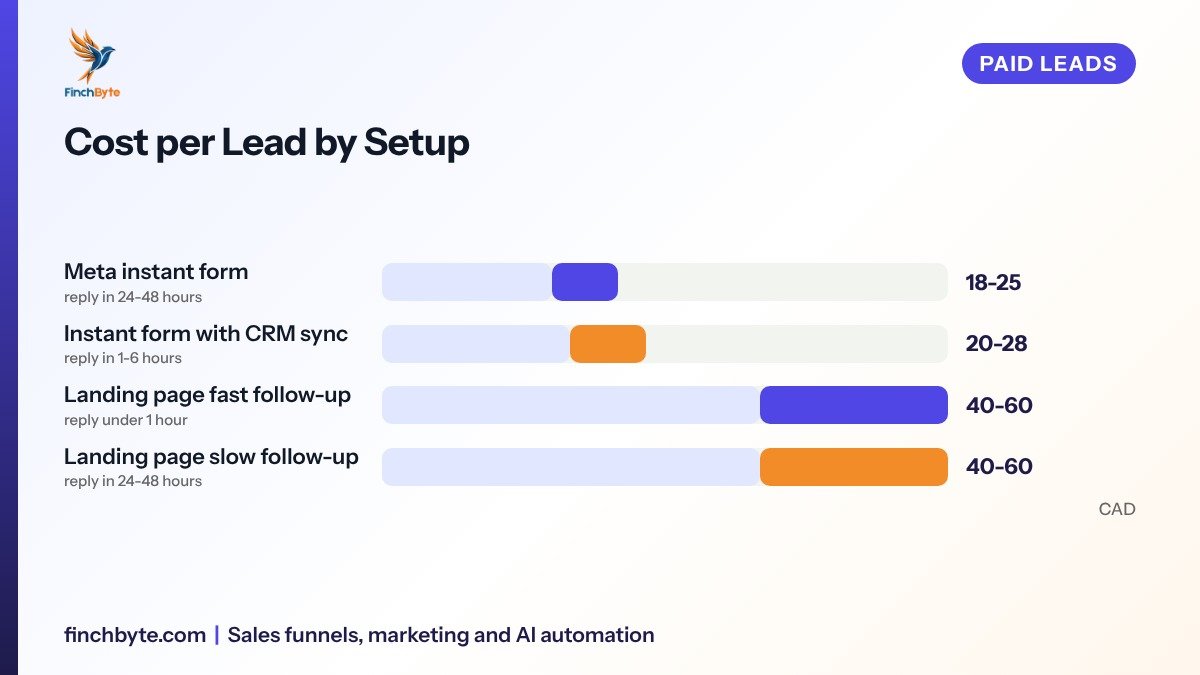
Read the last two rows together. The same landing page traffic can be wasted by slow follow-up alone, so the ad type is only half the decision.
Where the Money Quietly Leaks Out of Each Option
Lead ads leak through bad data and no memory
Prefilled fields are wrong more often than people expect, especially shared family phones and old profile numbers. You also get no page visit, so nothing lands in your pixel or your audience data. Nobody who submitted but never called can be retargeted, because they never appeared on your site. Consent is another quiet problem: a form filled inside an app is thin evidence that someone agreed to marketing messages, which matters under rules like CASL in Canada and the DPDP Act in India.
Landing pages leak through the click and the load
Every step loses people. A mobile page that takes more than about 3 seconds to show its form can lose a meaningful share of the traffic that clicked. Add a form with seven fields and you lose most of what is left. And if the ad says one price while the page says something else, the visitor reads it as a bait and closes the tab.
If calls make up most of your enquiries, both setups need the same fix. Offline Conversion Import for Google Ads: Match Calls to Ads explains the principle, and Meta has the same idea through offline conversions, where your CRM sends the qualified outcome back to the ad account.
A 6-Step Way to Decide for Your Business
Work through these in order. Most businesses finish in under an hour and never argue about this again.
- Set one measuring column. Pick the outcome you actually want, usually a booked appointment or a qualified conversation, and cost per that outcome. Cost per lead is a diagnostic, not a target.
- Get your current reply time. Pull last month's submissions and note the time from submission to first human contact. If it is over 24 hours, no ad format will rescue you.
- Check your data plumbing. Confirm leads reach your CRM automatically and that UTM Tracking for Small Businesses tags every ad, so each source stays separate in reports.
- Run the honest test. Send the same offer and the same creative to both setups for 14 days, at a comparable daily spend, and count only qualified outcomes.
- Price the follow-up. Estimate what your team spends chasing dead numbers on the lead form side, and what the page costs you in lost clicks. Add both to the cost per outcome.
- Commit to a mix. Keep whichever wins the qualified column, and move budget in small steps rather than all at once.
Measure cost per qualified conversation, not cost per lead, and the argument between lead ads and landing pages settles itself.
When to Choose Instant Forms, and When a Page Wins
Pick instant forms when the offer is simple and time-bound, the audience is cold, and your team can reply the same day. They suit open houses, health check-up camps, free assessments and seasonal promotions, where volume and speed matter more than detail.
Pick a landing page when the decision needs explaining, when you need to qualify before you call, or when the buyer will compare you with two other firms. Consultancies, manufacturers, B2B services and higher-ticket clinics almost always do better with a page.
Run both when you have a broad audience. Instant forms feed the top of the funnel and a short qualification sequence moves the serious ones into your pipeline, while retargeting sends the curious to a page that can answer their questions.
| Situation | Better fit | Why |
|---|---|---|
| Simple offer, tight window | Instant form | No page to build, fastest to launch |
| Cold audience, low awareness | Instant form | Lower friction gets first contacts |
| Complex or high-ticket service | Landing page | Explains scope and filters tyre-kickers |
| Need audience and retargeting data | Landing page | Visit history stays on your side |
| Small team, replies same day | Either | Follow-up speed matters more than format |
What to Ask Before Hiring an Agency
Ask who owns the ad account, the pixel and the lead list, and get it in writing. Ask for the scope in plain words: which campaigns, which audiences, how many creative variants, and who writes the form questions. Ask what appears in the monthly report and insist on qualified enquiries and cost per outcome, not impressions. Confirm the reporting cadence and who answers between reviews. Finally, ask how they close the loop between the ad account and your CRM, because an agency that cannot explain that handover will keep showing you cheap leads that never become revenue. Finchbyte covers that handover as part of Performance marketing, measured on qualified enquiries.
Common Mistakes to Avoid
- Judging by cost per lead alone. A $20 lead that never answers costs more than a $60 lead that books an appointment.
- Skipping qualification questions. Two or three questions on a form, or three fields on a page, filter out most accidental submissions.
- Letting native leads sit unexported. Without CRM sync, form leads age out of usefulness within a day or two.
- Sending all traffic to the homepage. Every campaign needs its own page or form that repeats the exact promise of the ad.
- Testing both at once without tags. Without separate UTMs you cannot tell the two sources apart in GA4 lead tracking.
- Blaming the format for a slow inbox. If replies take two days, the follow-up process is the problem, not Meta.
If nobody on your team can answer a new enquiry within a few hours, fix the process first. Lead Follow-Up Process: From Enquiry to Useful Conversation walks through the routing and reply rules that make either format work.
Conclusion
Meta lead ads vs landing pages is not a permanent choice, it is a question of which kind of lead your business can turn into a conversation. Instant forms buy volume and speed to first contact; landing pages buy intent, data and a cleaner pipeline. Whichever you run, the same three things decide the outcome: a qualifying question, a lead that reaches your CRM automatically, and a human reply inside a few hours.
Want this set up for your business? Book a free growth audit or Talk to Finchbyte.
Disclaimer: Results vary by business, market, budget and execution. This article is general guidance, not a promise of specific rankings, leads or revenue.
Frequently asked questions
Are Meta lead ads cheaper than landing pages?
Usually yes on paper. Instant forms often cost less per submission, because the form is prefilled and the buyer never leaves the app. Once you count how many of those leads answer the phone, the gap usually shrinks or disappears.
Do lead ads hurt my retargeting data?
They give you less. A buyer who submits a native form never visits your site, so nothing is added to your pixel or audience lists. You can still build audiences from the lead list itself, but you lose the visit history that a landing page gives you.
Can I run instant forms and landing pages at the same time?
Yes, and many accounts should. Keep the offer and creative consistent, tag each campaign with its own UTMs, and judge both on cost per qualified enquiry so one is not hiding behind a flattering cost per lead.
Why do my lead ads bring wrong phone numbers?
Prefilled fields come from the profile, which is often outdated or shared. Adding one or two questions the buyer must type, plus a confirmation step, filters out most of those bad entries.
How long should I test before choosing?
Give it 14 days of steady spend on the same offer and audience, then compare qualified outcomes rather than submissions. Shorter windows in small accounts mostly measure luck.
Which format is better for clinics?
For simple, time-bound offers with a team that replies the same day, instant forms work well. For higher-value treatments that need explanation and qualification, a landing page usually produces fewer but far more bookable enquiries.
Does a landing page need to be fast?
Yes. On mobile, a page that takes more than about 3 seconds to show its form loses a meaningful share of the clicks you paid for. Speed and one clear form matter more than design polish.
- #Meta lead ads vs landing pages