LinkedIn Ads for B2B Lead Generation: A Setup Guide
Set up LinkedIn Ads for B2B lead generation: audience sizing, lead forms, realistic monthly budget ranges, and a measurement plan for qualified enquiries.
Finchbyte Team 9 min read
Most B2B founders have the same story. A competitor keeps showing up in their feed with a clean sponsored post, so they load up Campaign Manager, pick job titles and a job function, set a daily budget and wait. Three weeks later they have 40 clicks, eight form fills, two of which were students, and a bill that makes the channel look broken. Nothing about the platform was wrong. The setup was guessed at.
This guide walks through LinkedIn Ads for B2B lead generation the way we would set it up inside a client account: how to size an audience before you spend, when to use a lead form and when to send people to a page, what a realistic budget looks like, and how to measure the whole thing so your monthly report shows qualified enquiries instead of clicks.
Who LinkedIn Ads actually suit
LinkedIn earns its keep when your buyer is identifiable by a job title, an industry or a company size, and when one closed deal covers a lot of campaigns. A manufacturer selling CNC components to plant managers in Ontario, or a SaaS team selling compliance software to operations directors, fits well. A clinic looking for walk-in patients or an e-commerce store selling consumer goods does not, and the money is better spent on Local SEO or Meta.
Three conditions make it work:
- A narrow buyer. You can name the two or three job titles that actually sign the purchase order, not the fifteen that touch it.
- Deal value that carries the cost. Qualified enquiries from LinkedIn usually cost more each than from search, so a single sale needs to be worth enough to absorb that.
- A sales conversation after the click. If a form fill goes straight into a CRM and nobody calls, the channel starves. Compare your setup against a Lead qualification checklist before you launch.
If your buyer also searches with clear intent ("bulk packaging supplier canada"), Google Ads usually closes faster. LinkedIn is strongest for a buyer who is not searching yet but is the right person, which is why it sits alongside a B2B lead generation plan rather than replacing it.
Set one objective before you touch Campaign Manager
Campaign Manager offers awareness, consideration and conversions. Ignore the first two for lead generation. Awareness campaigns buy impressions at a cost per thousand that looks cheap and produces nothing you can put in a pipeline.
Choose a conversions objective with a lead form or a website conversion as the outcome. Then set the conversion you actually care about, which is usually a booked call or a demo request, not a page view. If your account optimises for something your sales team would never call, the algorithm happily delivers more of it.
One warning on objectives: running a single campaign to two different audiences with two different offers splits your learning data and slows delivery. One campaign, one audience, one offer, so the system has enough signal to optimise.
Size the audience before you buy anything
Audience size decides whether your budget has anywhere to go. LinkedIn's own guidance is to build toward a reach of at least 1,000 people per week per ad group, and accounts that fall far below it see delivery stall and costs climb. Check the estimated audience size in the left panel before you commit a single dollar.
Build it in layers:
- Job titles and seniority. Two or three titles that buy, plus a seniority band. Do not stack twelve titles; the overlap makes the estimate meaningless.
- Industry or company size. A NAICS-style industry filter or an employee-count range keeps you off the feeds of people who could never buy.
- Matched audiences. A company list of your target accounts, or a website-visitor list for people who already read your pricing page. These usually outperform cold interest targeting.
- Exclusions. Current customers, competitors and job seekers. This one line saves more wasted spend than any bid change.
Use interest and job-function layers only as a last resort. They are broad, and on a small budget they spread you thin. If your list of target companies is under a few hundred names, a company list beats any interest stack.
Choose the lead form or the landing page
Lead forms (LinkedIn's native instant forms) sit inside the feed and pre-fill the user's name, email and job title. They produce more submissions per click because there is no page load and no typing. The trade-off is quality: a pre-filled form asks no effort, so some submissions are half-considered.
Send people to a page when the offer needs context, when you want to control the questions, or when you need the click itself to filter out casual interest. A quote request for a manufacturer or a demo booking for software usually earns a better conversation on a page than in a form.
A practical rule: test a lead form with one or two custom questions added (company size, timeline) against a landing page, and judge both on qualified conversations, not volume. Whichever wins, connect that page to the same standards as your Landing page design work: one promise, one form, one next step.
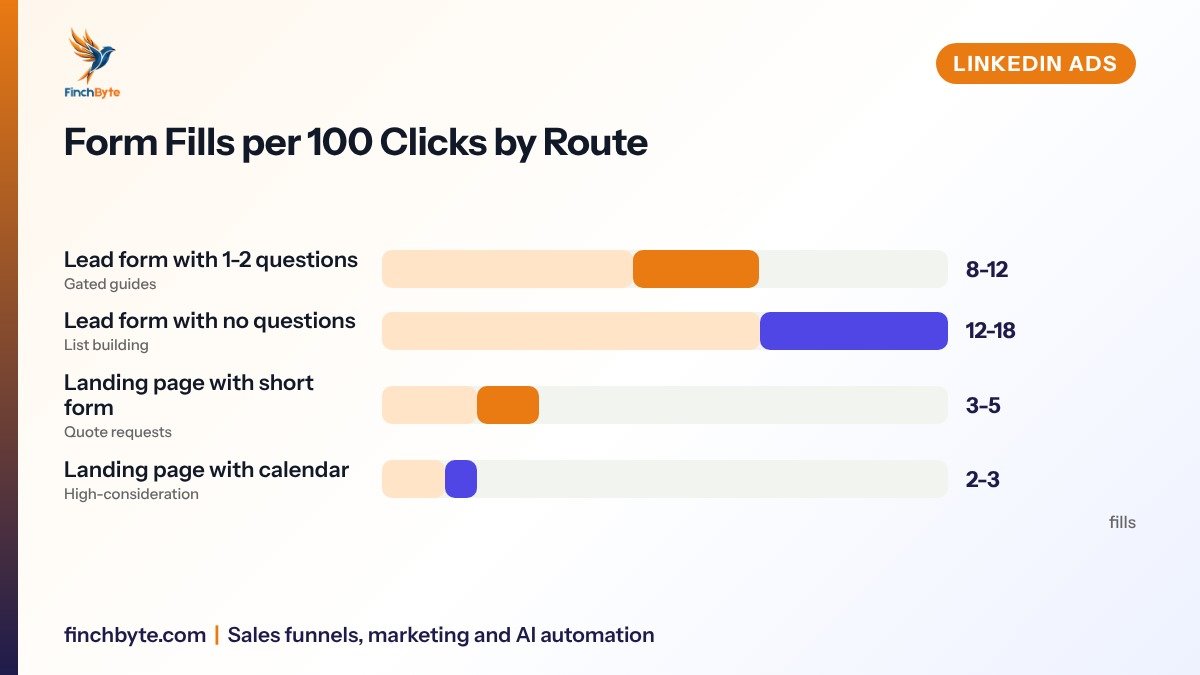
Per 100 clicks, the form with no questions collects the most names and the fewest conversations. The page with a calendar collects the fewest names and about as many real conversations. That is the whole argument in one table, and it is why volume is the wrong number to optimise.
Write creative that survives a busy feed
LinkedIn shows a headline, a short description and an image, and truncates more than you expect on mobile. Assume people read six words.
- Name the buyer in the first line. "Operations directors at food manufacturers" tells the right person the ad is for them and tells everyone else to scroll.
- Lead with the outcome, not the feature. "Cut quote turnaround from five days to one" beats "AI-powered quoting platform".
- Use one idea per ad. A carousel that explains four things converts worse than a single image that makes one claim.
- Show real work. A photo of a installed line, a screenshot of a report, a diagram of your process. Stock photography of people shaking hands gets scrolled past.
- Refresh every 4-6 weeks. Same audience, same creative for two months and frequency climbs while results fall.
Run three or four variants inside one ad group and let LinkedIn rotate them. Do not duplicate the same creative across separate campaigns; you end up bidding against yourself.
Budget and bidding without burning the month
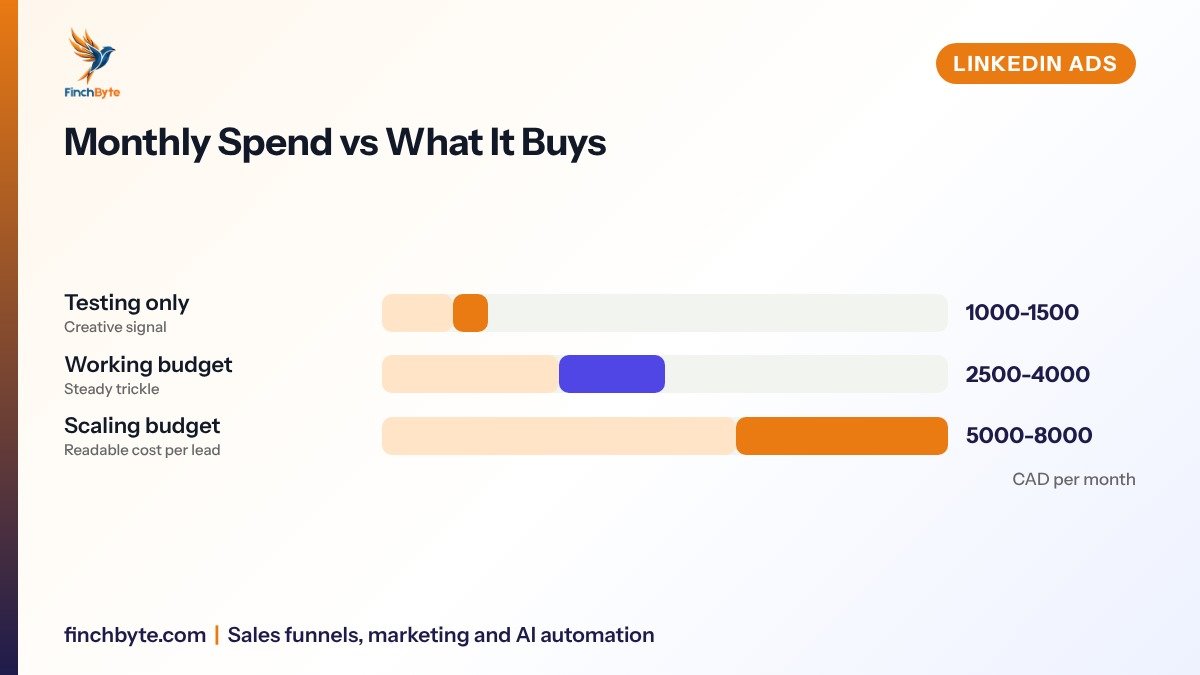
LinkedIn's minimum daily budgets are higher than Google's, and cost per click runs higher too. The honest answer for most small B2B teams is that a month of meaningful testing costs more than they expect, and a two-week trial on a small budget tells you nothing.
Start with cost cap or manual CPC rather than maximum delivery, so a runaway day does not eat the month. Set the cap near the suggested bid and raise it only when delivery is genuinely starved. Then watch pacing the way you would in a search account: a flat daily spend beats a front-loaded month, and Budget pacing habits transfer directly.
Give any new campaign 3-4 weeks and roughly 10-15 conversions of learning before you judge it. Turning it off in week two is the most common way teams lose money on this channel, because they pay for the learning and never collect the optimisation.
On LinkedIn you are rarely buying a lead with this click; you are buying the right person's attention and paying for the follow-up that turns it into a meeting.
Measure it as a lead channel, not a click channel
This is where most LinkedIn reporting fails. Clicks and form fills look like results and are not. The chain has to run from ad to pipeline:
- Tag every destination URL. Add campaign, source and medium parameters so the enquiry record shows which campaign produced it, using the same naming rules as your UTM tracking sheet.
- Mark the real conversion. Fire a conversion event on the thank-you page or the booked-call confirmation, and import it as your primary conversion. Never count a page view.
- Import what happens offline. A form fill or a booked call that closes into a deal needs to come back into the account, which is exactly what an Offline conversion import does for search campaigns.
- Score each enquiry in the CRM. Qualified, not qualified, no answer. Without this label, cost per lead is a vanity number.
- Report on qualified cost, not cost per click. The number your owner or board needs is cost per qualified enquiry and cost per booked meeting, in the same shape as a Monthly marketing report.
If your site cannot tell an enquiry from a click, fix that before scaling spend. The GA4 lead tracking walkthrough covers the events and exclusions that stop form views being reported as leads.
Common Mistakes to Avoid
- Targeting every title that touches the deal. Ten titles with heavy overlap inflate reach and dilute relevance. Pick the two that sign.
- Optimising for cheap form fills. Volume with no custom questions and no qualification step produces a list nobody calls.
- Judging the campaign in week two. Learning takes 3-4 weeks and 10-15 conversions; stopping early means paying twice.
- Sending all traffic to the homepage. Nobody converts from a homepage. Send each audience to a page that repeats the ad's promise.
- Skipping exclusions. Without excluding customers and job seekers, a meaningful slice of spend goes to people who will never buy.
- Reporting clicks to the owner. Cost per qualified enquiry is the only LinkedIn number worth putting in a report.
What to Ask Before Hiring an Agency
If you hand this to an agency, ask these five things before signing:
- Scope. Which audiences, offers and creative do they build, and which do you supply? Get it in writing.
- Reporting. Ask to see a sample report. If it leads with impressions and clicks rather than qualified enquiries, that is the report you will get all year.
- Ownership. Your own ad account, your own pixel and your own CRM data, with admin access you keep after the contract ends.
- Timelines. What they expect in the first 30 days versus day 90, stated as work completed rather than rankings promised.
- Tracking. Who sets up conversions, UTM naming and the offline import? If nobody owns it, results will be argued about rather than read.
Be sceptical of anyone who guarantees a cost per lead before seeing your offer and market, or who wants to run your account inside their own agency account.
Conclusion
LinkedIn Ads for B2B lead generation works when the buyer is identifiable, the deal is worth enough to carry the click cost, and the follow-up is real. Size the audience before you spend, choose the lead form or the landing page on purpose, give the campaign its learning window, and report on qualified enquiries rather than clicks. Do those five things and the channel becomes predictable; skip them and it becomes the most expensive feed in your stack.
Want this set up for your business? Book a free growth audit or Talk to Finchbyte.
Disclaimer: Results vary by business, market, budget and execution. This article is general guidance, not a promise of specific rankings, leads or revenue.
Frequently asked questions
What is a realistic LinkedIn Ads budget for a small B2B company?
Most small B2B teams need about 2,500-4,000 CAD a month to test two audiences against one offer and read the results. Under roughly 1,000-1,500 a month you get creative signal only, not a fair verdict on the channel.
Are LinkedIn lead forms better than landing pages?
Lead forms collect more submissions per click because they pre-fill details, but the conversations are often weaker. A landing page with a short form or a calendar usually produces a similar number of qualified conversations from fewer clicks, so judge both on qualified enquiries.
How long before LinkedIn Ads show results?
Give a new campaign 3-4 weeks and roughly 10-15 conversions so the delivery system finishes learning. Early weeks usually look worse than later ones, and switching campaigns off in week two means paying for the learning without collecting the optimisation.
How do I measure LinkedIn leads properly?
Tag every destination URL with UTM parameters, fire a conversion event on the thank-you page or booked-call confirmation, import closed-deal data back into the account, and label each enquiry in the CRM as qualified or not. Then report cost per qualified enquiry.
How big should a LinkedIn audience be?
Aim for an estimated reach of at least 1,000 people per week per ad group. Audiences far below that starve delivery and push costs up, which is why stacking a narrow company list with a couple of job titles often works better than one very tight filter.
Do LinkedIn Ads work for local businesses?
Usually not. If your customer buys locally and searches with intent, search and local channels are cheaper per enquiry. LinkedIn fits businesses whose buyers are identified by job title, industry or company size, such as manufacturers, SaaS and professional services.
Should I retarget website visitors on LinkedIn?
Yes, once the list is large enough to deliver, typically a few hundred active visitors. Retargeting people who read your pricing page with a specific offer is often the cheapest qualified enquiry in the account, but it needs a warm audience built by other campaigns first.
- #LinkedIn Ads for B2B lead generation