Google Ads Negative Keywords: A Weekly Cleanup Routine
A weekly routine for Google Ads negative keywords that stops wasted spend on jobs, DIY and competitor searches. Learn the report to run and what to block.
Finchbyte Team 11 min read
You open the monthly report and the numbers look respectable. Clicks are up, the average cost per click looks reasonable, and the account has spent its full budget. Then someone on the sales team mentions that three of last week's enquiries were people looking for a job with you, not a quote from you. That gap between a healthy-looking report and a wasted budget is where Google Ads negative keywords earn their keep.
This guide covers a repeatable weekly routine you can finish in about fifteen minutes: which report to read, the categories of searches worth blocking, how to decide between campaign level and ad group level, and the checks that stop you from blocking your own traffic. It is written for owners and marketing managers running lead generation accounts, not for agencies managing dozens of clients.
What Negative Keywords Do in Search Campaigns
A negative keyword is a term you tell Google to exclude, so your ad stops showing when a search contains it. In a search campaign, your ads match queries that are close in meaning to your keywords, not just the exact words you bid on. That flexibility is useful for reach and expensive when it drifts.
The mechanism is simple. Google evaluates your negative list at auction time. If the query contains a negative term in the right form, your ad is ineligible for that auction. Nothing else in the account changes, your bids stay where they are, and your quality scores are untouched.
What makes this worth a weekly slot in your calendar is that the drift is continuous. Google adds new matching behaviour, seasons change what people type, and someone in your industry starts using a word in a new way. A list you built once at launch quietly stops covering the queries that matter.
Negative keywords do not improve your ads. They only make sure the right person sees them.
If you are still setting the account up, get the tracking sorted first so you can see which searches convert. Our walkthrough of GA4 lead tracking explains how to measure enquiries rather than clicks, which is what makes a cleanup decision obvious instead of a guess.
Why Search Terms Drift Away From Your Keywords
Broad and phrase match do their job too well. A clinic bidding on the phrase "physiotherapy near me" can surface for "physiotherapy salary" or "how to become a physiotherapist" because the words overlap. The system is not making a mistake. It is following intent signals that look similar on paper and are nothing alike in reality.
Three forces push the drift along. Match-type expansion widens reach over time as Google looks for incremental volume. Autocomplete and related-search suggestions teach searchers new phrasings, some of which have nothing to do with buying. And in lead generation, the same phrase often carries two completely different intents, one of which you cannot serve.
The cost shows up in two places. Direct spend on clicks that never had a chance of converting is the obvious one. The subtler one is data pollution: your conversion rate, cost per lead and learning signals all get diluted by traffic that was never in your market. Accounts in this space commonly lose somewhere between 10 and 25 percent of budget to irrelevant queries before anyone tidies them up.
That number is a typical range, not a promise for your account. Your actual figure depends on match types, how wide your keyword list is and how ambiguous your industry language happens to be.
The Five Categories Worth Blocking First
Rather than hunting query by query, sort what you find into buckets. Five categories cover most of the waste in service, clinic and B2B accounts.
| Category | Typical spend at risk (%) | Typical search pattern |
|---|---|---|
| Jobs and hiring searches | 3-6 | Salary, jobs, hiring, resume, course, diploma |
| DIY and free searches | 3-7 | How to, free, template, software, download |
| Other industry meanings | 2-5 | A word that means something else elsewhere |
| Competitor brand searches | 1-4 | Brand names of other companies |
| Out-of-scope locations | 1-3 | Cities or countries you cannot serve |
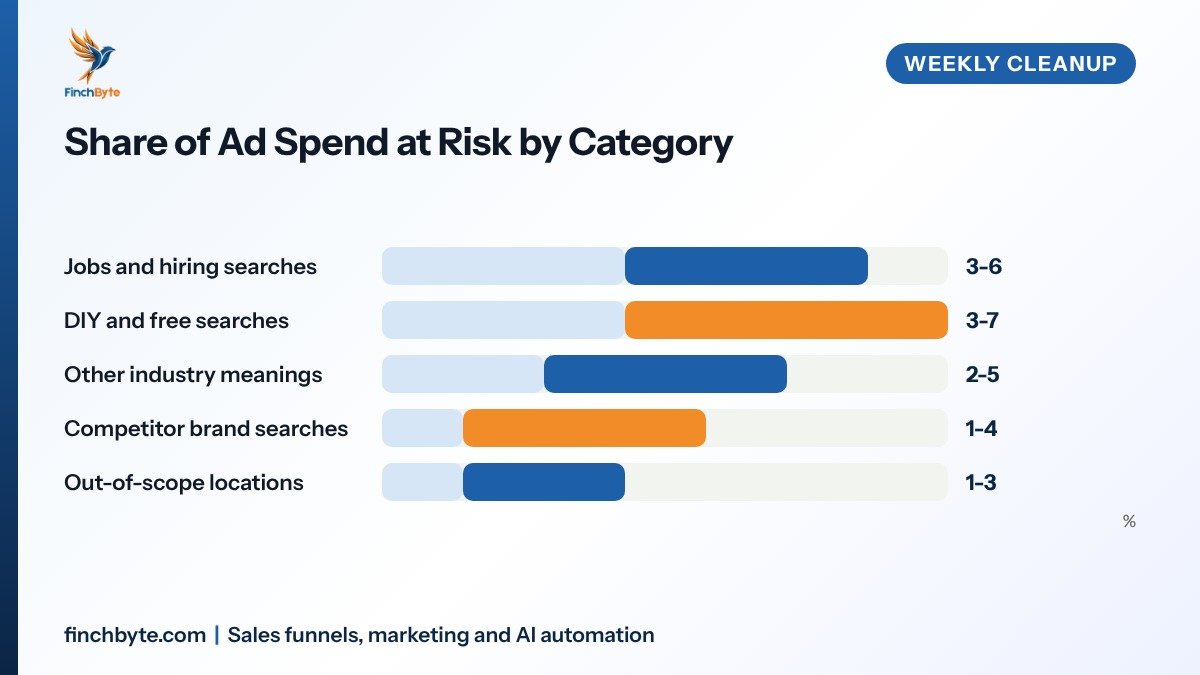
Jobs and hiring. These searches are the clearest waste in the lot, usually 3 to 6 percent of spend. Someone typing "marketing manager salary Toronto" is not going to fill out your quote form, and each click still costs you. Block job, jobs, salary, hiring, resume, careers, course and training when your industry words double as job titles.
DIY and free. A searcher after a free template or a tutorial is solving the problem themselves, and this bucket often runs as high as 3 to 7 percent. Block free, download, template, example, sample, software and "how to" where the phrase clearly signals a self-serve intent. Be careful with "how to" on its own, since plenty of genuine buyers start there and some of them are worth keeping.
Other industries. Ambiguous words are the quiet leak, typically 2 to 5 percent. A "funnel" means a marketing funnel to you and a kitchen part to someone else. "Lead" means an enquiry to you and a metal to a hardware searcher. "CRM" collides with a completely different acronym in other fields. Block the alternate meaning with a qualifier rather than the bare word.
Competitor searches. Blocking rival brand names is a policy call as much as a budget one, and it usually sits between 1 and 4 percent. Competitor terms often convert at a lower rate and can carry a higher cost per click, and you may not want the comparison battle at all. If you do bid on them, keep them in a separate campaign so their economics stay visible.
Out-of-scope locations. If you serve three cities in Ontario, searches naming a city in another province are a leak, generally 1 to 3 percent. Location targeting handles most of this, but a broad keyword can still trigger a nearby-area query that lands outside your service zone.
The Weekly 15-Minute Routine
Run this on the same weekday each week so it becomes a habit rather than a rescue mission. Set the report window to the last 7 days, and stretch it to 30 days once a month so you catch slow-burning terms that a single week misses.
- Open the search terms report. In Google Ads, go to Insights and reports, then Search terms. Filter to campaigns using broad or phrase match, since exact match rarely surprises you.
- Sort by cost, not clicks. A term with 40 clicks at ten cents matters less than six clicks at eight dollars. Cost tells you where money actually left the account.
- Sort by unclicked clicks next. This surfaces queries Google charged you for that produced nothing at all, which is the fastest way to find obvious junk.
- Add every clear miss as a negative. Anything in the five categories above goes straight onto the list while you are looking at it. Do not make a note to handle it later.
- Check the borderline terms against your landing page. For anything ambiguous, ask whether the person who typed it could reasonably have bought from your page. If yes, leave it alone.
- Log what you added. Keep a simple running record of terms, dates and the campaign they came from, so a colleague can see why a term is blocked six months from now.
Fifteen minutes covers this comfortably in a normal account. If the report takes an hour every week, your keyword list is too wide and match types are doing more work than they should. The Google Ads budget pacing guide covers the wider spend-control side of that problem.
Campaign Level or Ad Group Level
Where you place a negative keyword changes what it blocks, and getting it wrong is the most common way to lose good traffic. The table below shows how long each placement takes to apply as well.
| Placement | Hours until it applies | Best used for |
|---|---|---|
| Account level shared list | 0-1 | Universal junk such as free, jobs, salary |
| Campaign level list | 1-4 | Intent that is wrong for one service line |
| Ad group level list | 4-24 | Cross-match between your own keyword themes |
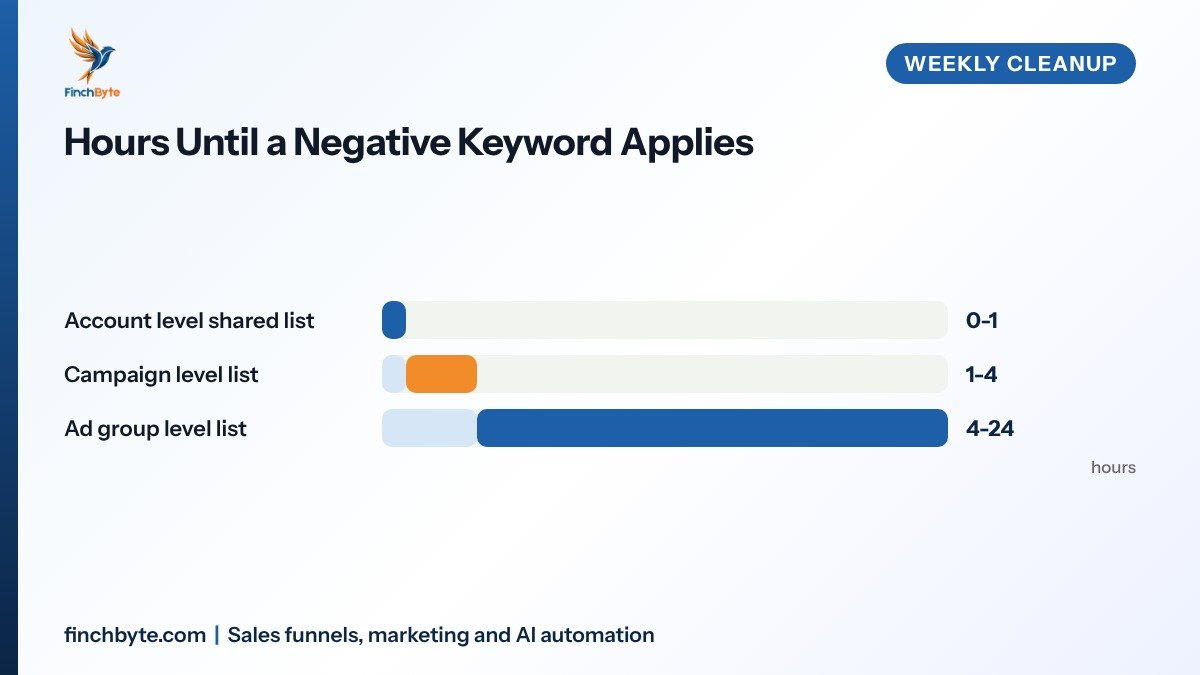
Account level. Use a shared list for terms that are never useful anywhere, such as jobs, salary or free download. These apply within about an hour. The advantage is one place to maintain. The risk is that a term harmless in one campaign can be valuable in another, so keep this list short and boring.
Campaign level. This is the default for most decisions, and it usually takes effect within one to four hours. A term that is wrong for your "commercial cleaning" campaign may be exactly right for "residential cleaning", so it belongs on the campaign list, not the account list.
Ad group level. This is where you separate your own themes, and it can take four to twenty-four hours before the term stops triggering. If one ad group targets "crm software" and another targets "crm services", searches containing "software" should be negative in the services group only. That keeps each ad group's traffic clean and makes your reporting readable.
That timing detail is why a weekly rhythm beats a quarterly sweep. An existing search term you have already paid clicks on does not always stop the moment you save the change, so adding a negative is not a same-day refund.
How to Choose Match Type for Each Negative
Negative keywords use their own match types, and the narrow one behaves differently from regular keywords.
| Negative match type | Blocks | Watch out for |
|---|---|---|
| Negative broad | Queries containing all the words in any order | Wider than you expect |
| Negative phrase | Queries containing the exact word order | The everyday default |
| Negative exact | Only that exact query and close variants | Plurals are separate terms |
Negative exact does not match plural forms the way regular exact match does, so "plumbing service" and "plumbing services" are two separate negatives. That surprises people and leaves a gap they think they have closed.
Reach for negative phrase in most cases. It blocks the word order you specify and nothing else, which is predictable enough to maintain without a spreadsheet. Use negative exact when a single query is genuinely expensive and you want zero side effects. Use negative broad sparingly, because it can quietly block searches you never intended to touch.
A practical rule: block the smallest thing that fixes the problem. You can always widen a negative later. You cannot easily notice traffic you silently lost.
Common Mistakes to Avoid
Most negative keyword damage comes from over-blocking rather than under-blocking. These are the patterns that show up most often in audits.
- Blocking a word that also converts. Before you add any term, run it through the search terms report with conversions as a column, since one good query buried in junk will cost you real pipeline.
- Using one shared list for everything. Account-wide lists are convenient and careless, because a term that is junk in one campaign is often your best keyword in another.
- Sweeping up every irrelevant query. A term with two clicks and no conversions is noise, not a pattern, so leave anything too small to matter and watch it for a month.
- Never reviewing the list. Old negatives quietly outlive their usefulness, so read your existing list once a quarter and delete anything that no longer applies.
- Ignoring the landing page. If your page ranks for a query you dislike, the fix is often a clearer headline or a tighter keyword list, not another negative.
- Forgetting search partner networks. Irrelevant queries often arrive from placements you never chose, so check where the traffic came from before blaming your keywords.
If you use UTM parameters across campaigns, the search terms report lines up more cleanly with your lead source data, which makes borderline calls faster. For accounts where calls matter as much as forms, our Lead generation checklist covers how phone traffic fits into the same picture.
What to Ask Before Hiring an Agency
If someone else runs your account, these questions keep negative keyword work from becoming invisible.
- Scope. Ask which campaigns and match types are covered, and whether the search terms report is reviewed weekly or only when costs spike.
- Reporting. Ask to see the actual terms added and removed each month, not a line item that says "list maintenance".
- Account ownership. Confirm you own the Google Ads account, the shared negative lists and the conversion actions, so a handover does not lose the work.
- Timelines. Ask how quickly a new irrelevant term gets blocked, and what the escalation path is when spend jumps mid-week.
- Tracking. Ask how conversions and calls are measured, since a cleanup routine without reliable conversion data is guesswork.
Finchbyte handles this inside ongoing Digital marketing management, with every change visible in your client portal. If you want a second opinion on an existing account, the Free growth audit looks at search terms, tracking and spend together.
Conclusion
A short weekly pass through the search terms report is one of the cheapest improvements available in a lead generation account. Google Ads negative keywords do not win you new business, but they stop you paying for searches that were never yours, and they keep the data you use for every other decision honest. Fifteen minutes a week, five categories to sort into, and the discipline to block the smallest thing that fixes the problem.
Want this set up for your business? Book a free growth audit or Talk to Finchbyte.
Disclaimer: Results vary by business, market, budget and execution. This article is general guidance, not a promise of specific rankings, leads or revenue.
Frequently asked questions
How often should I update negative keywords in Google Ads?
Once a week for accounts running broad or phrase match, using a 7-day window in the search terms report. Add a monthly pass over 30 days to catch slow-burning terms that a single week is too short to show.
Do negative keywords affect my quality score or bids?
No. A negative keyword only makes your ad ineligible for auctions containing that term. Your bids, ad rank and quality score inputs stay as they are, and the change shows up as lower spend and a cleaner click mix.
How many negative keywords should an account have?
There is no good target number. A small local account may need 50 to 150 well-chosen terms, while a wide B2B account can need several hundred. Judge the list by whether irrelevant queries still appear in the report, not by its length.
Why is my ad still showing after I added a negative keyword?
Check the match type and the plural form first, since negative exact does not match plurals the way regular exact match does. Placement timing matters too, as ad group-level additions can take up to a day to apply.
Should I add competitor names as negative keywords?
Only if you have decided not to compete for those searches. Competitor terms usually convert worse and cost more per click, but blocking them is a strategy choice. If you do bid on them, keep them in their own campaign so the numbers stay clear.
Can negative keywords hurt my campaign?
Yes, if you block a word that also brings buyers. Always run the term through the search terms report with a conversions column before adding it, and prefer the narrowest match type that solves the problem.
Do negative keywords work the same in Performance Max campaigns?
No. Performance Max does not take a keyword list, so it has a negative keyword list only for brand and generic term exclusions at the account level, which is narrower than search campaign control. Check Google's current help documentation for what your account supports.
- #Google Ads negative keywords